Microsoft is releasing its latest preview updates for supported versions of Windows 10. These updates are also known as ‘C’ and ‘D’ week updates, with the letter standing for the week of the month (Patch Tuesday, which is the second week of the month, is the ‘B’ week update). Being that all supported versions of Windows 10 gets the same bits, they’re all getting the same update today.
Specifically, the update is for Windows 10 versions 21H1, 20H2, and 2004, and
KB5004296 will bring the build number to 19043.1151, 19042.1151, and 19041.1151, respectively. You can
manually download it here, and these are the highlights:
• Updates an issue that prevents gaming services from opening certain games for desktop
users.
• Updates an issue that prevents you from entering text using the Input Method Editor
(IME). This might occur, for example, after startup if you have set the power options to
shut down a laptop by closing its lid.
• Updates an issue that plays the sound for selecting something in a game loudly when you
press the trigger button on a game controller.
• Updates an issue that prevents power plans and Game Mode from working as expected.
This results in lower frame rates and reduced performance while gaming.
• Updates an issue that fails to detect that you are connected to the internet after you
connect to a virtual private network (VPN).
• Updates an issue that causes printing to stop or prints the wrong output. This issue occurs
when you print using a USB connection after updating to Windows 10, version 2004 or
later.
As usual, there are a ton of fixes as well. Here’s the full list:
KB5004296 Fixes• Addresses an issue with searchindexer. After you sign out, searchindexer continues to hold
handles to the per-user search database in the profile path,
“C:\Users\username\AppData\Roaming\Microsoft\Search\Data\Applications\<SID>\”. As
a result, searchindexer stops working and duplicate profile names are created.
• Addresses an issue that prevents gaming services from opening certain games for desktop
users.
• Addresses an issue that prevents you from entering text using the Input Method Editor
(IME). This might occur, for example, after startup if you have set the power options to
shut down a laptop by closing its lid.
• Changes the functionality for uploading new activity into Timeline. If you sync your
activity history across your devices using your Microsoft account (MSA), you cannot
upload new activity into the Timeline. You can still use Timeline and see your activity
history (information about recent apps, websites, and files) on your local device. This
does not affect Azure Active Directory (AAD) accounts. To view web history, Microsoft
Edge and other browsers provide the option to view recent web activities. You can also
view recently used files using Microsoft OneDrive and Microsoft Office.
• Addresses an issue that might cause the File Explorer window to lose focus when you are
mapping a network drive.
• Addresses an issue that causes File Explorer to stop working after reaching 99%
completion when you are deleting many files on a mapped network drive.
• Addresses a timing issue in the Group Policy Registry Telemetry that causes Group Policy
extension processing to fail.
• Addresses an issue that repeatedly rebuilds the Windows Filtering Platform (WFP) filters.
This issue occurs when a device is enrolled in a mobile device management (MDM) service
and “MDMWinsOverGP” is set.
• Addresses an issue with an MDM service that fails to correctly apply certain junk mail
rules.
• Addresses an issue that always reports the update build revision (UBR) as zero (0) on a
device during enrollment to an MDM service.
• Addresses an issue that causes the enrollment of the Elliptic Curve Digital Signature
Algorithm (ECDSA) certificate to fail with the error, “0x80090027
NTE_INVALID_PARAMETER”. This issue occurs when the Trusted Platform Module (TPM)
provider (the Microsoft Software Key Storage Provider) stores the key.
• Addresses an issue with auditing events 4624 and 5142 that display the wrong event
template when Dutch is the display language.
• Addresses an issue that causes System Integrity to leak memory.
• Addresses an issue that plays the sound for selecting something in a game loudly when
you press the trigger button on a game controller.
• Addresses an issue that prevents power plans and Game Mode from working as expected.
This results in lower frame rates and reduced performance while gaming.
• Addresses an issue in which “Network Internal Access” appears on the taskbar network
icon on systems that access the internet from certain domains.
• Addresses an issue in which the Network Connectivity Status Indicator (NCSI) fails to
detect internet connectivity after you connect to a virtual private network (VPN).
• Addresses an issue that causes printing to stop or prints the wrong output. This issue
occurs when you print using a USB connection after updating to Windows 10, version
2004 or later.
• Addresses a rare issue that might degrade performance in applications that call
Gdiplus.dll!GdipMeasureString in a tight loop with a new font on each call. This issue
occurs after installing Windows updates released on and after February 2021.
• Addresses an issue that incorrectly routes some audio channels when streaming using
certain fixed channel layouts.
• Addresses an issue that always displays devices that RemoteFX USB redirects as “Remote
Desktop Generic USB Device” instead of the actual device name.
• Addresses an issue in which Set-RDSessionCollectionConfiguration does not set the
camerastoredirect:s:value custom property.
• Addresses a Local Security Authority Subsystem Service (LSASS) domain controller
memory leak that is reported in Privileged Access Management (PAM) deployments.
• Addresses an issue that prevents you from accessing a network drive that maps to a
Distributed File System (DFS) root after you sign out.
• Addresses an issue that prevents you from reconnecting to mapped network drives after
you sign in and displays an access denied error. This issue occurs if you use the net use
/deep option to create multiple drive mappings to different paths on the same encrypted
file share.
• Addresses an issue that prevents access to files on a Server Message Block (SMB) share
when you enable Access Enabled Enumeration (ABE).
• Addresses an issue that prevents the Windows Server service from starting if SrvComment
is greater than 128 characters.
• Addresses an issue in the Windows Network File System (NFS) client that might prevent
you from renaming a file after mounting an NFS share. This issue occurs if you rename
the file using File Explorer, but does not occur if you rename the file using command line.
• Addresses an issue with an unhandled Open File dialog critical exception. As a result,
Microsoft Foundation Class (MFC) applications might close unexpectedly.
• Adds a new policy that creates generic strings and removes branding-specific terms, such
as “Windows” or “PC”, for IoT Enterprise editions. For example, we changed “computer” to
“device”. Instead of “Getting Windows ready,” we changed that to “Getting things ready”
and so on. These generic strings display on a user’s screen when an update is in progress.
• Addresses an issue in which the Storage Sense page in Settings might incorrectly report
the size of some storage devices that use the GUID Partition Table (GPT). The affected
devices will incorrectly report in Storage Sense that the size is twice as large as the size
reported in File Explorer.
There are actually a few known issues as well:KB5004296 Known Issues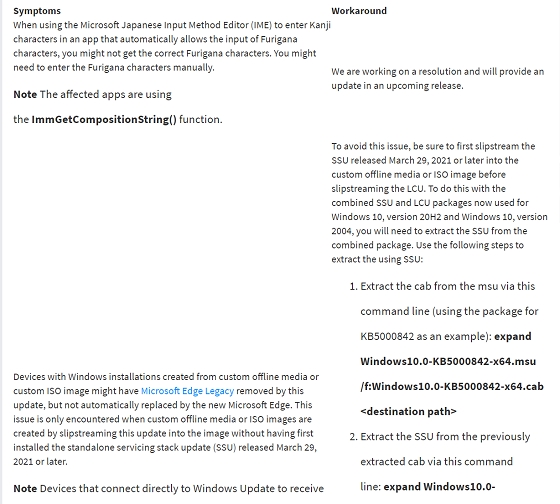
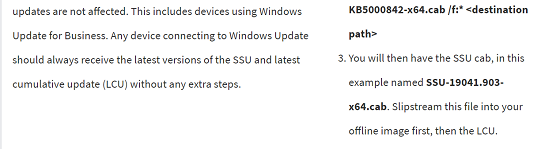
If you have already encountered this issue by installing the OS using affected custom media, you can mitigate it by directly installing the
new Microsoft Edge. If you need to broadly deploy the new Microsoft Edge for business, see
Download and deploy Microsoft Edge for business.
After installing the June 21, 2021 (
KB5003690) update, some devices cannot install new updates, such as the July 6, 2021 (
KB5004945) or later updates. You will receive the error message, “PSFX_E_MATCHING_BINARY_MISSING”.
As mentioned above, this is an optional update. You can obviously download it and install it manually from the Update Catalog. You can also get it through Windows Update. If you go to Settings -> Update & security -> Windows Update and check for updates, you’ll be presented with an option to download and install this. You can ignore it if you want to. If you do, these fixes will be bundled into next month’s Patch Tuesday update for Windows 10, and that will be mandatory.
If you’re on
Windows 11, you’re not receiving regular Patch Tuesday or optional updates. Preview builds are updated on a different schedule.
source
