Love your GMail account but want to do more with it? If you're a Windows user, there are plenty of great (and free) apps that take advantage of your massive inbox in the cloud!
GBridge (
http://www.gbridge.com/) sets up a Hamachi-like VPN and offers loads of cool features for your Windows desktop, including file sharing, backup and synchronization, and remote control via VNC. Since the developers added support for Google Apps domains, this has become a great way to keep your office team connected.
GMail Drive (
http://www.viksoe.dk/code/gmail.htm) is an oldie but a goodie. I've got several of gigs available, and there's no chance I'm going to fill that up with actual email anytime soon. Plug GMail Drive into Windows, and you can drop files into your extra space just like any other folder on your system.
g2peer (
http://g2peer.com/home/home.php) allows simple file sharing with your friends via your GMail account. Don't need the other features from GBridge? g2peer is a good option. Your pals at the other end don't even need to install the app to get files from you since it supports "command line" interaction via GMail - check the help page (
http://g2peer.com/help/help.php) to see how it works.
GMail Backup (
http://www.gmail-backup.com/download) gives you an easy way to save a copy of your precious cloud-based inbox on your local system. This app requires IMAP access to GMail, so make sure you've enabled it in your preferences. GMB also has a restore feature - which makes it a handy way to migrate from one GMail address to another should you ever need to do that.
GPhoto Space (
http://www.gphotospace.com/download.html) provides you with one more place you store and share photos online. Why bother? Maybe you don't want to set up a Flickr or Picasa Web album. Maybe you just want a mostly private place to store some photos for personal viewing.
Affixa (
http://www.affixa.com/) offers an easy way to tell Windows GMail is your default mail client and to send file attachments right from your desktop. If you'd rather not bother with a desktop email app and IMAP or POP access to GMail, Affixa is a handy way to bridge the gap between your PC and the cloud.
Pidgin, (
http://www.pidgin.im/) though it doesn't technically provide any straight-up GMail functionality, does let you chat with your GMail contacts who are signed in to chat. The newest version even provides Google Voice and Video support.
Digsby, (
http://www.digsby.com/?utm_campaign=new_w&utm_content=new&utm_medium=new&utm_source=new) of course, will let you chat with those people too - you'll just need to use Tokbox (
http://www.tokbox.com/) if you want voice and video chat. It does, however, support incoming mail notifications. As always, we recommend grabbing the alternate installer.
Gmail Notifier Plus (
http://www.nirmaltv.com/2009/07/31/gmail-notifier-plus-for-windows-7/) (right) makes a slick little addition to your Windows 7 desktop, with jumplist support and the ability to check multiple GMail accounts.
The GMail Reader Gadget (
http://gallery.live.com/liveItemDetail.aspx?li=0ab7b1be-4f2d-4f30-aa55-f270d53b9c99&bt=1&pl=1) is one of the best options available for your Windows 7 or Vista Sidebar - assuming you're into gadgets, of course.
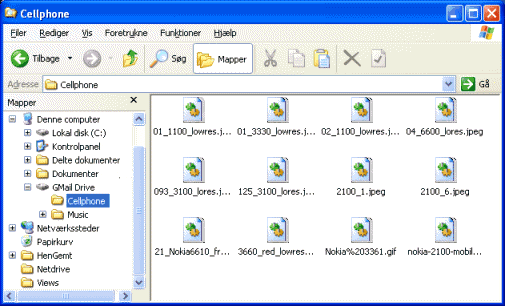
GMail Drive shell extension
Gmail Drive Video
Gmail Drive Shell Extension - Virtual Hard Drive - 7 Gigabytes Free!
g2Peer - share files on your PC through Gmail
g2peer video
g2Peer Quick Start
GPhotospace for Windows and Mac
GPhotospace Video
GPhotospace 
affixa Web or Desktop Mail? You choose!
Affixa Video
Inviare allegati anche di grandi dimensioni con Affixa e Gmail
pidgin IM all your friends in one place
Pidgin Video
Pidgin - Free Instant Messenger: AIM, YIM, MSN, IRC, GMail..
Customize the look of digsby
Digsby Video
Instant Messenger + Social Networking + EMail = Digsby
tokbox to use with digsby
Tokbox Video
TokBox Walkthrough
Gmail Notifier Plus for Windows 7
Gmail Notifier Video
Gmail Notifier checks your Google Mail automatically without opening your Browser!Google Reader

Google Reader Video
Google Reader in Plain Englishsource:mostly downloadsquad
