Recent Posts

Pages: 1 ... 4 5 [6] 7 8 ... 10
51
Huawei Pura X Max is here to rival Galaxy Wide Fold and iPhone Ultra.



Huawei has launched a series of foldable phones with a conventional design over the past few years, establishing a strong presence in this market segment alongside Samsung. The Pura X Max is Huawei’s latest foldable phone, set to be officially unveiled on April 20. However, ahead of the official announcement, the company has already offered a closer look at the device and its distinctive design.

Huawei’s official Weibo account has shared images of the Pura X Max, showcasing its design and color options. While most foldable phones follow a tall-and-skinny form factor, the Huawei Pura X Max adopts a wider passport-style design, offering a fresh take on foldable smartphones.

At first glance, the Pura X Max resembles a mini tablet thanks to its wide foldable design. The camera bump on the rear panel is also quite noticeable. Huawei has yet to reveal the official specifications of the device; however, based on previous leaks, it is expected to feature a 7.5-inch main display and a 5.3-inch outer screen. The outer screen could be a drawback for some users, as most foldable phones nowadays feature outer displays of at least 6-inches. Promotional images also show the device in four color options.

In terms of hardware, the Pura X Max is rumored to be powered by the Kirin 9030 chipset, paired with either 12GB or 16GB of RAM. The phone is already available for preorder in China, with the official unveiling scheduled for April 20.

The Huawei Pura X Max introduces a new form factor to the foldable smartphone market and appears well-positioned to challenge upcoming devices such as the Galaxy Wide Fold and Apple’s first foldable iPhone, rumored to be called the iPhone Ultra. So far, Samsung’s foldables have largely followed a conventional design, but the company is reportedly working on a wide-style foldable. Similarly, rumors surrounding Apple’s first foldable iPhone suggest a wider display format.

The Galaxy Wide Fold is expected to launch on July 22, while the iPhone Ultra is rumored to be unveiled alongside the iPhone 18 Pro and iPhone 18 Pro Max at Apple’s September event.

Huawei has yet to announce the global availability of the Pura X Max, in any case the company remains banned in the US market, meaning the US-based customers would have to bypass carriers and retail stores in order to purchase the device, and even then have to worry about being blocked by Google services.

source
52
Microsoft confirms Office LTSC 2021 support ends October 2026, urging businesses to move to Microsoft 365 or LTSC 2024.


Microsoft is shutting down several of its products this year, including, but not limited to, the Access Database Compare tool, Publisher, and Outlook Lite on Android. Now, Microsoft has reminded customers that another suite of apps is set to retire this year, and also suggested an alternative.

Office LTSC 2021 suite and the standalone applications that it comprises of are facing the chopping block on October 13, 2026. As is common in these scenarios, these pieces of software will continue to function but they will not receive any security fixes, patches for bugs, or technical support from Microsoft. What this also means is that if you face any sort of issue, such as a break in compatibility, you are not guaranteed any assistance from Microsoft.

The Redmond tech giant has suggested multiple upgrade paths for small businesses and large enterprise organizations. For the former entities, those with fewer than 300 seats, the following are viable alternatives as long as you are OK with being connected to the cloud:

   • Microsoft 365 Business Premium

   • Microsoft 365 Business Standard

   • Microsoft 365 Apps for business

Meanwhile, larger organizations should consider the following:

   • Microsoft 365 E3

   • Office 365 E3

   • Microsoft 365 Apps for enterprise


These Microsoft 365-powered versions of Office applications offer better security, management capabilities, and compliance. In addition, it also includes Copilot integration, can be installed on multiple devices per user, and dynamic updates that keep you always updated.

However, for those who are more comfortable with the on-premises variant of Office and want to continue down that path, Office LTSC 2024 is still an option. This is the most recent version of on-prem Office for commercial LTSC customers and also includes new versions of Visio and Project. Do choose your migration path carefully though, because Office LTSC 2024 will reach end of support on October 9, 2029.

source
53
Saying 'user credentials and financial data were exposed to risk' An outdated SDK carries a dangerous flaw


(Image credit: Shutterstock / tomeqs)


   • Microsoft found EngageLab SDK flaw affecting 50 million Android devices

   • Vulnerability let apps bypass sandbox and access private data

   • At least 30 million installs were crypto apps, patched in v5.2.1


Roughly 50 million Android devices were using apps with vulnerabilities that allowed threat actors to access private data stored on those devices, experts have warned. Many of those installations were cryptocurrency apps, which only made the problem bigger.

Security researchers from Microsoft said they identified an “intent redirection vulnerability” in EngageLab SDK, a popular software development kit that helps build user engagement features such as push notifications or in-app messaging.

"This flaw allows apps on the same device to bypass Android security sandbox and gain unauthorized access to private data," Microsoft wrote in its report.

Removing vulnerable apps

Intent is a mechanism in Android, used for communication between apps (or between multiple components inside a single app). It acts as a message object carrying data and instructions, allowing a component to request an action from another (such as opening an activity, or triggering a function).

While any app can send an intent, whether it’s accepted depends on the identity and permissions of the sending app.

Microsoft did not say which apps contained the vulnerable SDK but said that at least 30 million of the downloads fell on cryptocurrency apps. The bug was discovered in April 2025, in version 4.5.4. It was patched in November the same year, in version 5.2.1.

All of the apps built with the bugged SDK were removed from Google’s Play Store, it was said.

Microsoft also stated that it found no evidence of malicious actors discovering this flaw beforehand and using it as a zero-day in real-life attacks. However, developers are urged to update the SDK to the newest version as soon as possible.

"This case shows how weaknesses in third‑party SDKs can have large‑scale security implications, especially in high‑value sectors like digital asset management," Microsoft said. "Apps increasingly rely on third‑party SDKs, creating large and often opaque supply‑chain dependencies. These risks increase when integrations expose exported components or rely on trust assumptions that aren’t validated across app boundaries."

source
54

Windows app development shifted from a single stable model to multiple frameworks

When WhatsApp made the universally hated decision to switch its native Windows app to a web wrapper, most of the criticism was directed at Meta. And rightly so. It felt lazy, it was a clear, RAM-hogging downgrade, and it removed what little “native” experience the app had on Windows.

But the reality is a bit more uncomfortable.

Even Meta didn’t have much incentive to stick with a native Windows app. The company barely updated it, didn’t bring feature parity, and eventually defaulted to the web version instead. The main reason is probably for the fact that web apps are cheaper to build and maintain. But the actual issue is that Microsoft hasn’t given developers a UI framework they can commit to in the long term. Web apps don’t have that problem.


We recently heard from a long-time Windows Latest reader, Alexander Ovchinnikov, who also happens to be a developer. His points echo what a lot of developers already feel.

Unlike macOS, which always gets native apps, despite having a much smaller user base, developers’ attitude toward pushing web apps just for Windows isn’t about convenience. It’s about trust, or rather, the lack of it.

Over the years, Microsoft has introduced multiple “future” frameworks, only to move away from them later. From WPF and Silverlight to UWP and now WinUI 3, the company hasn’t changed this pattern. As Alexander puts it, many developers now assume that whatever Microsoft is pushing today might not last long enough to justify building on it.

Microsoft hasn’t had a clear GUI strategy in decades, and Windows now offers too many frameworks without a definitive answer on what developers should actually use.

Knowing this changes the outlook I had on web apps for Windows. They’re a fallback option when the platform itself feels uncertain. However, Microsoft’s recent love for making 100% native apps for Windows may turn things around.

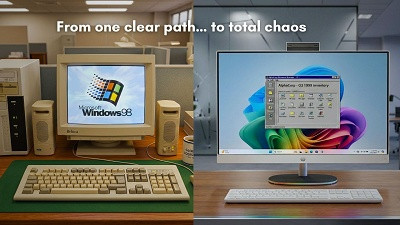
Windows went from one clear development path to too many confusing choices

There was a time when building a Windows app didn’t require a mental debate. Early Windows development revolved around a single, well-understood approach. Win32 was the answer. One API, one mental model, and a clear way to get things done.

Charles Petzold’s “Programming Windows”, which was universally regarded as the “Bible” of Windows development, made it accessible, and developers could invest their time knowing the platform wasn’t going to shift under their feet. That stability created trust, and trust made the ecosystem grow.

However, instead of evolving Win32 into something more modern, Microsoft kept introducing new layers and alternatives. First came MFC as a C++ wrapper. Then WinForms for .NET developers. WPF followed with XAML and hardware-accelerated rendering. Silverlight showed up as a cross-platform bet. Then came WinRT and UWP during the Windows 8 and Windows 10 era. And now we have WinUI 3 with the Windows App SDK, alongside MAUI for cross-platform development.

Each of these was announced with a strong pitch about being the future of Windows development. Each one asked developers to invest time, learn new patterns, and build on top of it.

The issue wasn’t that these technologies were bad. Many of them were genuinely ahead of their time. The problem was that the “future” kept getting replaced before it could fully settle. Instead of a single evolving platform, developers were left chasing moving targets.

Jeffrey Snover’s detailed blog points out that Windows stopped having a clear answer to a simple question: how should you build a Windows app?

WPF was supposed to be the future, until Silverlight came along, which looked promising, until Microsoft pivoted to HTML5. UWP was pushed as the unified platform for everything, but never gained full adoption, even internally. WinUI 3 is now positioned as the modern solution, but its roadmap hasn’t inspired the same level of confidence developers had in earlier eras.

When Microsoft introduces a new framework with a clear direction, developers will start adopting it. Then the strategy would shift, and attention would move elsewhere. The previous framework wouldn’t always be officially killed, but it would slowly lose relevance. This cycle repeated enough times that developers stopped fully committing.

As Alexander told us, the sentiment today is, if Microsoft couldn’t stick with previous frameworks, why assume the current one will be any different?

That’s how things look today. Ask a developer what they should use for a Windows app, and the answer depends on who you ask. Some will still recommend Win32. Others prefer WPF because it’s stable. WinUI 3 is positioned as modern, but not universally trusted yet. MAUI exists for cross-platform use. Then there’s the web route with Electron or PWAs. On top of that, third-party frameworks like Avalonia and Qt are gaining traction.

This isn’t the kind of choice developers were asking for. It’s total uncertainty.

Why developers are choosing web apps instead of native

Some of the most popular Windows apps are not truly native. WhatsApp, Spotify, Discord, Slack, Notion, Zoom, and even parts of Microsoft’s own ecosystem…Microsoft Teams (before its rewrite), Clipchamp, and several first-party experiences use WebView2.


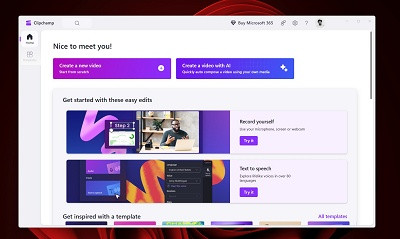
Microsoft Clipchamp

Of course, it has become so easy to build a web app once and ship everywhere. It can run on Windows, macOS, Linux, and even inside a browser without maintaining separate codebases. Frameworks like Electron, Chromium-based WebView, and Progressive Web Apps have made distribution simpler, updates faster, and development costs lower. Companies find it hard to ignore.

Microsoft’s pivot to WebView2 embeds the Edge (Chromium) engine inside apps. It works well for consistency, but it also means many “desktop” apps are just web pages running in a container.

And the obvious downside is that these apps consume more RAM, feel less responsive, and don’t integrate as deeply with the OS. Running multiple Electron apps at the same time can easily eat through system resources, something native apps traditionally handled much better.


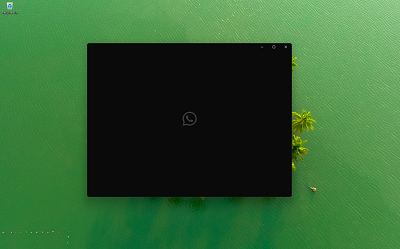
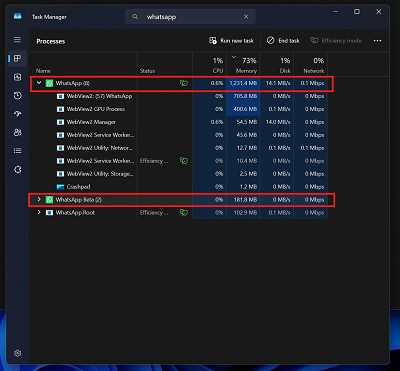
“WhatsApp” is new version and “WhatsApp Beta” is old UPW/WinUI in the screenshot

On macOS and iOS, developers still prioritize native apps. Even companies that have web technologies elsewhere build native versions for Apple devices. That’s because Apple has maintained a much clearer development path. Frameworks like Cocoa, AppKit, and now SwiftUI have been consistently supported and evolved. Developers know what to use, and more importantly, they know it will still be relevant years later.

Windows doesn’t have that same clarity, and developers respond accordingly.
So instead of betting on a framework that might change direction again, many choose the web. It’s not perfect, and in many cases, it’s objectively worse for desktop performance. But it removes the bigger risk of depending on Microsoft’s next decision.

Microsoft is trying to fix this, but it may be too late

There are signs that Microsoft is aware of the problem. Recent efforts suggest them moving toward improving performance, reducing reliance on web-based components, and building more native experiences across Windows. Rudy Huyn’s X post welcoming Windows developers to build 100% native apps has been looked upon in a positive light.
But fixing the apps themselves is only one part of the equation.

Even if Microsoft delivers better native apps going forward, developers are still going to hesitate. The hesitation doesn’t come from what WinUI 3 can or cannot do today. It comes from what happened to everything that came before it. Years of shifting priorities have made developers cautious, and that kind of hesitation doesn’t disappear overnight.

If Microsoft wants to change that, it should fully commit to one framework and communicate it well to developers. That also means sticking with a framework long enough for it to mature, making its direction clear, and supporting it. Developers need a roadmap they can trust, along with clear migration paths when changes do happen.

The real problem isn’t technology, it’s consistency

Microsoft doesn’t lack capability. The company has some of the best engineering talent in the industry and a long history of building powerful development tools. Many of the frameworks it introduced were genuinely strong from a technical standpoint.

What’s missing was and is consistency.


Rebecca Sutter’s analysis mentioned that the issue isn’t technical failure, but a pattern of internal decisions that repeatedly shift direction.

These have repeatedly translated into uncertainty for developers. From the outside, it doesn’t matter why those changes happened. What matters is the result. Developers were left with multiple paths, none of which felt guaranteed to last.

That’s why the situation looks the way it does today. The problem isn’t that Windows has too few options. It’s that none of them feels definitive. Developers are not asking for more frameworks. They’re asking for one they can trust.

Web apps are a symptom, not the problem

Web apps are not taking over Windows because they’re better suited for desktop computing. In many cases, they aren’t. They’re taking over because they offer reliability to developers who no longer want to invest in the Windows platform.

Developers can’t be blamed for making a calculated decision based on past experience.

If Microsoft wants to improve the quality of apps on Windows, the solution isn’t just committing to fix Windows 11 and build native first-party apps, but rebuilding trust with developers and proving that this time, the platform (WinUI3, I hope) will stay consistent.

source
55

Check your PC now — do not miss this deadline. NurPhoto via Getty Images

Windows users beware. Microsoft has confirmed that Secure Boot certificates, first issued in 2011, expire in 8 just weeks. This has not happened before, and it will affect hundreds of millions of PCs. Some users need an upgrade to stay safe.

If your PC shipped in the last two years, you are fine. But if it’s older, you need to ensure you have installed recent updates. Revised certificates are now integrated into wider software downloads. Be warned, if your PC has fallen off support, as is the case with hundreds of millions of Windows 10 PCs, then you will fall foul of the imminent certificate expiration and you need to enrol in the ESU now.

In its Apr. 2 update, Microsoft warns users that “Secure Boot certificates, originally issued in 2011, are approaching expiration in 2026. Updated 2023 certificates are being delivered automatically through Windows Update to consumer devices and some business devices. The Windows Security app now shows whether devices have received these updates, their current status, and whether any action is needed.”

As Neowin explains, Microsoft’s “useful warning about upcoming mandatory Windows 11/10 update installation” is a call to action for users. “Secure Boot update must be installed before the deadline which is fast approaching.” The good news now is that “you will now know whether it is already installed or not.”

source
56
Social Media / Microsoft warns: WhatsApp on Windows users targeted in new campaign
« Last post by javajolt on April 07, 2026, 03:22:48 AM »
Microsoft researchers found a campaign that abuses WhatsApp attachments to sneak a script onto Windows machines which will lead to the attacker gaining remote control.

WhatsApp offers a desktop application for Windows and macOS, which users can synchronize with their mobile devices. Desktop versions of WhatsApp are generally used as extensions of mobile apps rather than primary platforms. So, while wide usage of these apps exists, their adoption rate is likely significantly lower when compared to mobile platforms.

Last year, we wrote about Meta closing a vulnerability that allowed an attacker to run arbitrary code on a Windows system which existed in all WhatsApp versions before 2.2450.6.

The attacks found by Microsoft however are based solely on social engineering. The target receives a WhatsApp attachment that looks harmless enough, but it is actually a .vbs (Visual Basic Script) file that Windows can execute.

If the attacker manages to convince the victim to run the file on Windows, the script copies built‑in Windows tools into a hidden folder and gives them misleading names so they look harmless at first glance.

And the tools themselves are legitimate ones, but they’re abused to download malware. A classic living off the land (LOTL) technique which uses what’s already on the system instead of introducing malware binaries that would get picked up in a scan.

The next scripts are pulled from popular cloud providers, so network traffic looks like normal access to AWS, Tencent Cloud, or Backblaze instead of some shady server that would raise red flags.

To turn off other possible alarms, the malware keeps trying to elevate itself to administrator, then tweaks UAC (User Account Control) prompts and registry settings so it can silently make system‑level changes and persist across reboots.

At the end of the infection chain, an unsigned MSI (Microsoft Installer) sets up remote‑access software and other payloads, giving the attacker ongoing, hands‑on access to the machine and data.

How to stay safe

For home users and small businesses, there are some practical steps to stay safe:

■ Do not open unsolicited attachments until you have verified with a trusted source that they are safe.

■ Turn on View File name extensions in Explorer so that a file claiming to be picture but ending in .vbs or .msi can be identified as such.

■ Use an up-to-date real-time anti-malware solution to stop unwanted connections and identify malicious files.

■ Download software only from the vendor’s official site and check that installers are signed.

■ Don’t ignore warning signs. Unexpected UAC prompts, new software suddenly appearing, or your machine becoming sluggish after opening a WhatsApp attachment are all reasons for an anti-malware scan and, if needed, be prepared to restore from a clean backup.

■ Keep Windows and all other applications current to prevent from exploiting known vulnerabilities.

source
57
Windows 11 / Microsoft confirms Windows 11 is getting Chrome-like features
« Last post by javajolt on April 07, 2026, 02:49:45 AM »

Windows 11 Insider Program Settings is getting Feature Flags page to enable hidden features
without needing third-party tools


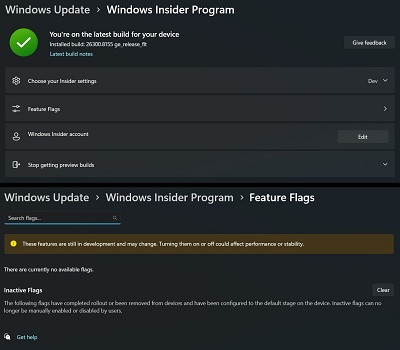
Windows 11 is getting a new “Feature Flags” page in the Settings app that can be used to manually enable or disable new features in the OS. Previously, you had to rely on third-party tools like ViVeTool, or wait for Microsoft’s Controlled Feature Rollout (CFR) to eventually bring it to your PC. Ironically, Feature Flags is currently hidden in build 26300.8155, and isn’t enabled yet.

Popular Windows watcher phantomofearth spotted a new Feature Flags option in the Windows Insider Program page just below “Choose your Insider settings”

In a statement to Windows Latest, Microsoft confirmed it’s testing ways to make it easier for Windows Insiders or enthusiasts to try out features early. The company told us it’ll share more details soon, and it’s fully committed to making Windows truly exciting. It’s just one of the changes coming to Windows based on feedback from testers.


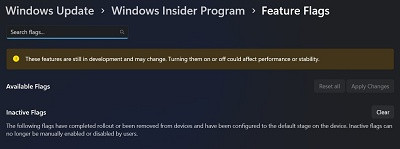
Microsoft is adding a Feature Flags page under Windows Insider Program settings.
Source: phantomofearth via X


As you can see in the above screenshot, if you click on “Feature Flags,” it would open a new Feature Flags page. Here, you’ll see a Search flag option, followed by a list of currently available flags and an Inactive Flags section, which includes features that have already completed rollout to the device.

Microsoft also includes a warning that says turning these features “on or off could affect performance or stability”, which is understandable because the whole point of the company’s CFR and A/B testing was to isolate the impact of distinct features and lessen the risk of widespread system instability.

Microsoft is adding Feature Flags to Windows Insider Program settings

Ever since Microsoft implemented their Controlled Feature Rollout scheme, I have always found myself in the unfortunate group that never gets the new features, and I would always take a considerable amount of time trying to find the IDs and manually enabling them with ViVeTool, just to test those features.

And this always confused me because the concept of being a Windows Insider lies in the fact that I want to test new features in Windows 11, even if they have a chance of breaking my PC.

So, Microsoft bringing the ability to manually turn on or off new features in Insider builds is a very welcome change in my books. However, we are still not sure if the company is planning to add all new “flags” to the Feature Flags list or if there will be a preliminary A/B testing or CFR before a device gets access to all new available flags.

But I digress, as a warning sign that says “These features are still in development and may change. Turning them on or off could affect performance or stability” may mean that Microsoft will likely add all new features in a new Insider build to the Feature Flags list, and users can manually enable or disable them, unless Microsoft has already completed rollout or removed from devices, in which case, they will be added to the Inactive Flags list.

Under Available Flags, phantomofearth also found two greyed-out buttons to Reset all flags and Apply Changes. The Inactive Flags section only has a Clear button, based on the screenshot.


Reset all and Apply Changes buttons next to the Available Flags option in Feature Flags settings page.
Source: phantomofearth via X


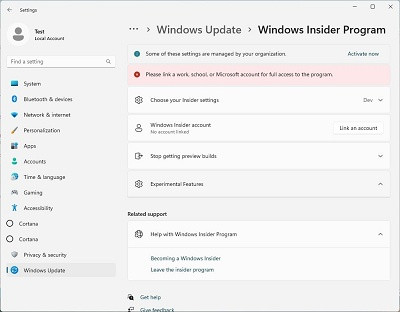
About two years ago, Microsoft had a similar “Experimental Features” option in the Windows Insider Program settings page, but that never surfaced beyond certain internal builds, as the company ultimately standardized on CFR.


The Windows Insider Program settings page with “Experimental Features” list

Now that Microsoft is gearing up to add long-requested features and fixes to Windows 11, it makes sense for them to give the community what we want and avoid friction for us to find and test new features coming to the OS.

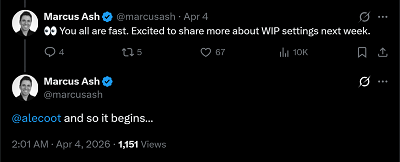
Marcus Ash, the Design and Research lead for Windows and Devices, replied under the post by phantomofearth, saying that they are “Excited to share more about WIP settings next week”, which likely means Feature Flags are coming to Windows Insider builds in the second week of April, as the feature is still hidden even in the latest builds.


Marcus also tagged Alec Oot, who is the PM working on Windows Updates and the Windows Insider Program, marking a new era for Windows 11…

This is the best time to be a Windows Insider

Back in the days of the Windows 10 Insider Program, which started in 2014, we had the Fast ring, Slow ring, and Release Preview, which had a clear ideology when it came to adding new features.

While there was the Canary Ring internally used by the Windows engineering team, Fast Ring was the first public group to receive the newest features, and was expectedly the most unstable. The Slow Ring received builds only after they were proven stable in the Fast Ring, which was usually 1 to 2 weeks later.

Release Preview was the final stage for builds that were nearly ready for the general public.


With the Controlled Feature Rollouts (CFR), Microsoft’s goal was to ship a “safe” build to everyone but only activate a risky new feature for a very low number of users to check if it crashes their systems first.

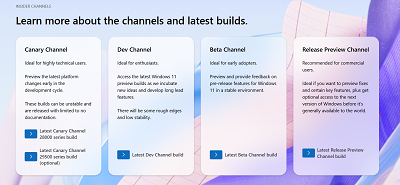
The Windows 11 Insider Program has four distinct channels, including Canary, Dev, Beta, and Release Preview, all with their distinct use cases.


So, for enthusiasts who want to test new features, they could choose the channel that worked for them, depending on how expendable the PC they were using for experimenting with Insider builds.

The new Feature Flags page in the Windows Insider Program settings page is bringing back this ability, and the exciting part here is that Microsoft already announced their plans to bring a whole host of features, fixes, and improvements coming to Windows in April and later this year.

Feature Flags potentially enable Insiders like me to test, provide feedback, and report on even early releases of these new updates, without having to wait the whole year, as CFR already made me do.

All this makes it the best time for anyone with a secondary PC to become a Windows Insider. The more the Insiders, the more the testing data for Microsoft, and more excitement surrounding all the new features coming to Windows 11 in 2026.

source
58
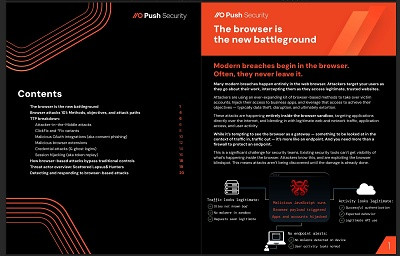
Browser-based attack techniques are behind the biggest breaches today.

Learn how they’re bypassing cybersecurity controls and what security teams can do about it.


The browser is the new battleground

Modern breaches begin in the browser.
Often, they never leave it.

Many modern breaches happen entirely in the web browser. Attackers target your users as they go about their work, intercepting them as they access legitimate, trusted websites.

Where we used to talk about novel software exploits and advanced endpoint malware, in 2026 we’re instead talking about cloud apps and identities as the “patient zero” of modern breaches.


Attackers are turning to browser-based TTPs
Attackers are innovating fast.

Attackers in 2026 are using a wide (and growing) range of browser-based techniques to achieve a common goal: compromise cloud applications and services accessed over the internet, and ultimately profit from data theft, disruption, and extortion. This is now the primary attack path.

We break down all of the major techniques, analysing in-the-wild use of AITM phishing, malicious OAuth apps, malicious browser extensions, credential stuffing (& ghost logins), ClickFix (and the family of *fix variants), and session hijacking.

Legacy tools can’t keep up

The browser is a blind-spot for most security teams.

Browser-based attacks are so effective because they find ways around many traditional control points and security tools.

It’s essential that blue teamers leave “list thinking” behind and re-evaluate whether their controls are providing the protection they thought they did.


59


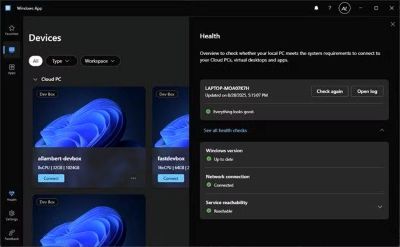
■ Microsoft's Remote Desktop replacement is called Windows App, a confusingly generic name.

■ Windows App works on macOS, iOS, Android, and the web, offering split-screen virtual monitors in a browser.

■ Windows App will replace the Remote Desktop client; the Remote Desktop Connection tool remains built into Windows.

When it comes to naming apps, I like to think I'm not being controversial when I say that I want its name to convey what the app actually does. At the very least, it has to be unique and identifiable so I can easily find it or search for it online. By giving an app a bland, generic name, not only does it not do the app itself any justice, but it becomes a lot harder to actually find it.

I mention this because Microsoft has published a blog post revealing all the new things the Remote Desktop replacement app can do. And the name Microsoft went with is...Windows App. Yeah, I'm not a fan, either.

Microsoft explains what Windows App can do

No, not Windows apps. Windows App


In a post over on the Windows IT Pro Blog, Microsoft goes over the new features of Windows App. The idea behind the weirdly generic name seems to stem from the app arriving on other operating systems, such as macOS, iOS, and Android, and can even work in your browser. As such, it likely conveys an element of "open this app to access Windows," but I can't imagine people will have a good time Googling error codes for it.

Despite its strange name, it sounds like Windows App has a lot of good features going for it. For one, Microsoft has made the app on macOS obey Apple's navigation patterns by cleaning up the Option+Tab switcher. This means people used to macOS's RemoteApp tools will have an easier time using Windows App. For those who want to connect via the browser, Microsoft has some nice features for you, too. As Microsoft puts it:


Windows App is set to replace the Remote Desktop client for Windows, which had its support cut off on March 27th, 2026. Fortunately, Microsoft is still keeping the Remote Desktop Connection tool built into Windows, so you do not have to download Windows App to continue using it. Let's just hope the new name doesn't confuse the enterprise users as much as it does for me.

source
60
Social Media / Hackers are taking over Signal and WhatsApp accounts, warns FBI
« Last post by javajolt on March 30, 2026, 09:20:12 PM »
FBI, CISA warn of Russian hackers hijacking Signal and WhatsApp accounts!

In a Public Service Announcement (PSA) the Federal Bureau of Investigation (FBI) and the Cybersecurity and Infrastructure Security Agency (CISA) warn the public about ongoing Russian-linked phishing campaigns that aim to gain access to messaging accounts.

Earlier this month we wrote about a large‑scale phishing campaign aimed at hijacking Signal and WhatsApp accounts belonging to senior officials, military personnel, civil servants, and journalists.

Now the FBI and CISA have joined European intelligence services in warning that the same tactics are being used in a broader campaign targeting these commercial messaging apps. The goal is not to break end‑to‑end encryption, but to walk straight around it by stealing access to individual accounts.

In our previous article, we focused on warnings from the Dutch intelligence services AIVD and MIVD, which described how Russian state‑backed actors approached high‑value targets via Signal and WhatsApp, posing as “Signal Support”, “Signal Security Bot”, or similar. The PSA demonstrates how the same groups are now running global phishing campaigns against messaging app accounts, with evidence suggesting thousands of compromised accounts worldwide.

It’s important to reiterate that the attackers have not managed to break the apps’ end-to-end encryption. Instead, they are relying on social engineering to get a device added so they can eavesdrop on accounts.

The current targets include current and former US government officials, military staff, political figures, and journalists, but there is nothing to stop the same techniques being reused against businesses and everyday users.

So, while it’s tempting to dismiss this as a problem for diplomats and generals (and the agencies issuing these alerts do mention high‑profile targets first), the techniques scale very easily. Once playbooks like these are public, they tend to be copied by cybercriminals looking for new ways to steal money or accounts.

How to protect your accounts

As the PSA puts it:

Quote
“Phishing remains one of the most unsophisticated, yet effective means of cyber compromise, often rendering other protections irrelevant”

This calls asks for basic security measures:

Treat unsolicited messages from “Support” inside apps as suspicious by default. Legitimate support for apps like Signal and WhatsApp does not ask you, in a chat message, to send back verification codes, PINs, or passwords.​ If you receive a warning about account problems, do not follow links in the message. Open the app’s settings directly or visit the official website through other means.

Never share SMS verification codes or app PINs. SMS codes are there to prove that you control a phone number. Anyone who has the code can pretend to be you. App‑specific PINs or passcodes are there to protect account changes. Giving them away is like handing over the keys to your account. Consider anyone asking for them to be a scammer.

Be careful what you discuss and with whom. Both the Dutch and US advisories remind us that even with end‑to‑end encryption, some conversations are too sensitive for commercial chat apps.

Use the extra security features these apps offer. Enable options like registration lock, registration PIN and device‑change alerts so that your account cannot be silently re‑registered without an extra secret. Store your PIN in a password manager instead of choosing something easy to guess or reusing a common code, to reduce the chance of social engineering or shoulder‑surfing.

Another useful feature is disappearing messages. Short‑timer and disappearing messages reduce how much content is available if an attacker gets into a chat later, or if someone obtains long‑term access to a device or backup. They are not a complete solution, but they can limit the damage.

What to do if you think your account was hijacked

If you suspect an attacker has taken over your messaging account:

1. Try to re‑register your number in the app immediately to kick out other devices.

2. Revoke all linked devices and change any app‑specific PINs or lock codes.

3. Warn your contacts that someone may have impersonated you and ask them to treat recent messages with caution.

4. Review recent conversations for signs of data theft (for example, shared IDs, documents, or passwords that should now be considered exposed).

5. Report the incident to the app provider and, where appropriate, to national reporting centers such as the FBI’s Internet Crime Complaint Center (IC3) at ic3.gov or the relevant authority in your country.​

The sooner you act, the smaller the window in which attackers can exploit your account.

source
Pages: 1 ... 4 5 [6] 7 8 ... 10