Recent Posts

Pages: 1 ... 3 4 [5] 6 7 ... 10
41
Android O.S | Apps / Android stuck in Safe Mode? Here's how to turn it off
« Last post by javajolt on September 03, 2026, 01:26:31 PM »


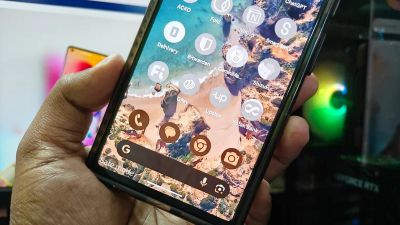
Safe Mode has a lot of utility when it comes to troubleshooting Android phone problems and protecting your device from malware. When an Android is in Safe Mode, all third-party apps are disabled, and Airplane Mode is activated. This means it's much easier to isolate a new app that may be causing problems like lag or battery drain. And if you're concerned about an application being malicious, you can easily delete it without interference or backend issues caused by the app.

Activating Safe Mode is simple: when on the power options menu, if you hold the Power Off button, a Safe Mode option will appear that you can select. Once you do, your phone will restart in Safe Mode. However, because it's so quick to activate, it's also easy to put your phone in Safe Mode when you don't mean to. A phone stuck in Safe Mode when you aren't trying to troubleshoot can be incredibly annoying — seeing all your apps grayed out when you're simply trying to use your phone as usual isn't something anyone user wants to deal with. Luckily, it's an issue that doesn't take long to resolve.

How to turn off Android Safe Mode


To turn off Android's Safe Mode on your phone, you have a few different options:

Turn off Safe Mode by restarting

 1. Access the power options screen, either by holding down the power button, or the power and volume down button, depending on your model of Android

2. Select Restart

3. When your phone restarts, Safe Mode will be turned off.

Turn off Safe Mode through the Notification Menu

1. Swipe down from the left side of the screen to access the Notification Menu

2. Find the notification that says your phone is in Safe Mode

3. Tap it the notification, and there will be an option to turn Safe Mode off

Airplane Mode may still be active after your phone is out of Safe Mode — you'll be able to tell by the airplane icon on the status bar. If so, it can be turned off by swiping down from the right portion of your screen to access the Quick Settings menu, then tapping the icon that looks like a plane.

Safe Mode isn't the only tool implemented on Android to protect users that can sometimes cause issues — Google Play Protect can also be a source of frustrating phone limitations, but thankfully it's also an easy fix.

source
42
Nintendo / Nintendo's surprise free update for Mario Kart 8 Deluxe on Switch 2
« Last post by javajolt on September 03, 2026, 01:15:47 PM »
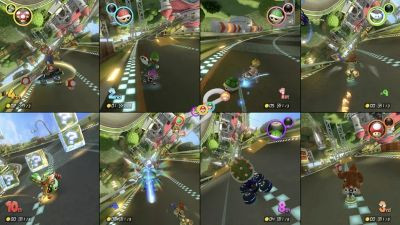
It includes eight-player split-screen

The nine-year-old game that keeps giving.

You'd be forgiven for thinking Nintendo had already squeezed every remaining drop of juice out of Mario Kart 8 Deluxe. After starting its life as a Wii U title in 2014, the already expanded Switch version of Mario Kart 8 that arrived three years later went on to receive even more new tracks and features, keeping it in the US sales charts for almost the entirety of the console's lifespan.

The Switch 2 launched last year with Mario Kart World, which looked like the end of the (Rainbow) road for its staggeringly successful predecessor, but Nintendo apparently isn't done just yet. Completely out of the blue (shell — OK I promise to stop now), the company has just rolled out a meaty new free update for Mario Kart 8 Deluxe specifically aimed at Switch 2 players.

You can now play with up to eight players in split-screen in local multiplayer, provided you have enough controllers to go around (original Switch controllers are also supported). Nintendo has also added CameraPlay support, so if you have an official Switch 2 camera or compatible USB-C camera connected to your console, you can see your friends' very own Luigi death stares when you overtake them. You can also use CameraPlay online via GameChat, just like in Mario Kart World.

Loading times are also now shorter, and you'll be getting "enhanced visuals" when playing in docked mode. Obviously this assumes you have a 4K TV that can take advantage of the Switch 2's improved output. Mario Kart 8 Deluxe could already output at 1080p in handheld mode via 'Handheld Mode Boost' but can presumably now do so natively thanks to the new update. 

Exactly why Nintendo is adding all these features to an old game instead of pushing even more people towards Mario Kart World is anyone's guess. The company has also been gradually improving the Switch 2-exclusive entry through updates, but by now a lot of people were hoping to have heard about DLC plans, given how many new tracks we got over the years in Mario Kart 8 Deluxe. 

Mario Kart World is still included in one of the recently revamped Switch 2 bundles, which costs $50 more than the same bundle did at launch but now also comes with a three-month Nintendo Switch Online membership.

source
43
Apple / Rare, working Apple I computer heads to auction
« Last post by javajolt on September 03, 2026, 01:03:44 PM »
The same model sold for over $671,000 in 2013.


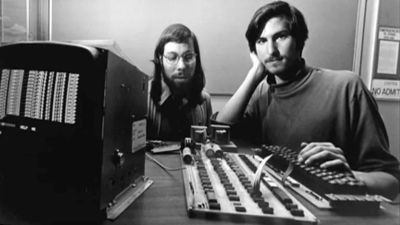
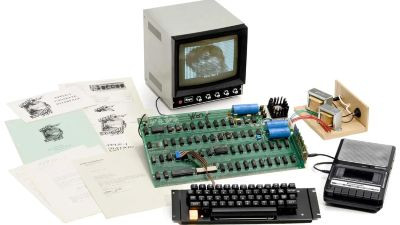
A piece of Apple history is headed to auction... again. The "Hatfield" Apple I computer, which sold for $671,400 in 2013, will be back on the block this fall. This time, auction house Bonhams expects it to sell for between $500,000 and $800,000 — just slightly higher than its original retail price of $666.66.

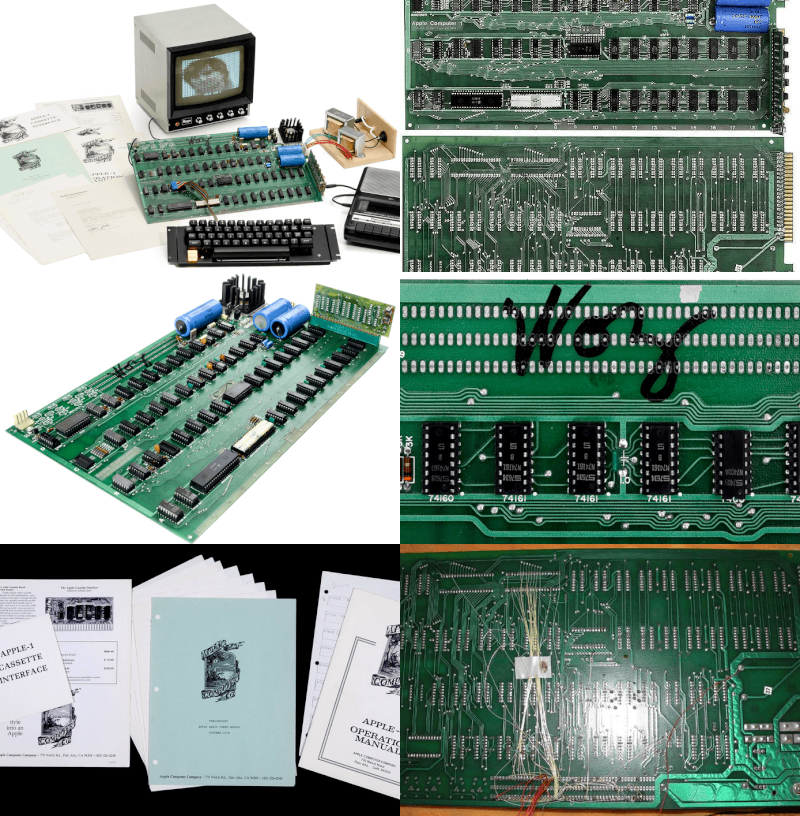
This particular Apple I is nicknamed for its original owner, Fred Hatfield, who bought it during Apple's inaugural year. The still-working machine is listed at No. 48 on the Apple I Registry. There are reportedly fewer than 75 surviving Apple I computers today, and even fewer that are still operational. The motherboard is signed by Apple co-founder Steve Wozniak, who designed the computer.

Apple's debut product


It's hard to see the Apple I as a consumer-friendly product by today's standards. After all, buyers had to supply their own power supply, keyboard and monitor. It had a whopping 4KB of RAM. But in the mid-1970s, a machine that came with a fully assembled motherboard and built-in video output was as approachable as a computer got. Only around 200 Apple I computers were produced.

Today, the Apple I is valued more for its historical significance and scarcity than its status as a world-changing product. It wasn't until the Apple II that the company broke away from the hobbyist market to become the household name it is today.

'Steven Jobs - Vice President, Operations'


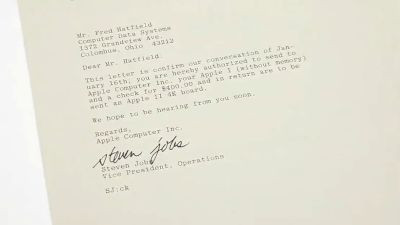
Alongside the autographed Apple I, the well-heeled buyer will also receive a letter signed by Steve Jobs. In addition to being a grade-A collector's item in its own right, the letter illustrates that, in the '70s, Jobs apparently handled at least some of the company's customer service.

Hatfield had contacted Apple to complain about the lack of software for the first-generation computer. In the 1978 letter, Jobs responded with a trade-in offer. "This letter is confirm our conversation of January 16th," Jobs wrote. "You are hereby authorized to send to Apple Computer Inc. your Apple I (without memory) and a check for $400.00 and in return are to be sent an Apple Il 4K board. We hope to be hearing from you soon."

Hatfield declined and later sold the Apple I to a collector for $40,000. That's a fraction of what it's worth today, but at least the original owner used the money to pay for good dinners and nights of music in New Orleans.

Bonhams plans to take the Apple I on a tour before the October 14 auction. The auction house will showcase it in Los Angeles from September 9 to 11, Boston from September 21 to 23, San Francisco from September 30 to October 1, and finally New York during its October sale.

source
44
Apple / The Apple-1 Registry
« Last post by javajolt on September 03, 2026, 12:55:18 PM »
List of all original Apple-1. If you are a first time visitor and not familiar with iconic Apple-1 computers, please read all the information first.

Go to previous entry #47   -   Go to next entry #49

Note: This is the 48th entry in the list, and not the 48th Apple-1 produced. The Apple-1 does not have a regular serial number. Only some Apple-1 have a handwritten serial number.


15 pictures published.

Version

2nd batch NTI
Wave-soldered mainboard

Serial number, stamp, label

no number on the back

Location

Belgium

Verification

Existence verified. Known to the registry caretaker or an expert. Auction. According to pictures.

Condition

Working condition

Website(s)

Breker auction

Description

Fred Hatfield of Computer Data Systems in Columbus, Ohio, is the first known owner; Hatfield is therefore the preferred name for this Apple-1.
Hatfield complained to Apple about the limited availability of software. In a letter dated January 18, 1978, and signed by Steve Jobs, Apple offered him an Apple II in exchange for his Apple-1 and an additional US$400. The original letter accompanies the computer.
Hatfield added an interface for an IBM Selectric printer. It was removed before the 2013 auction.

The motherboard was function-tested in 2013 and reported to be fully operational. According to the current owner, it has not been opened, modified, or operated since then.

History

The first known owner was Fred Hatfield of Computer Data Systems in Columbus, Ohio. He was not the former Major League Baseball player of the same name. The 2013 auction publicity also incorrectly described him as a former football player. Hatfield subsequently provided evidence identifying the auctioned computer as his Apple-1.
Before the 2013 auction, the Apple-1 was owned by Texas-based collector Cameron Cooper, who also owned #37. A reported sale from Hatfield to Cooper in the fall of 2012 for US$40,000 has not yet been independently verified.
Auctioned as lot 14 by Auction Team Breker on May 25, 2013, for €516,400 (about US$666,150). It has remained in the same private collection in Belgium since the auction.

Auctions

May 2013
(see History for more information)]

Components

White ceramic CPU, plastic PIA, 8 KB plastic DRAM. 3 small yellow, 2 small blue, and 3 large blue capacitors.

Equipment

Original Apple Cassette Interface, two cassettes, original Apple-1 Operation Manual, Preliminary Apple BASIC Users Manual, and the original letter from Apple Computer to Fred Hatfield, dated January 18, 1978, and signed by Steve Jobs.

State

An interface for an IBM Selectric printer had been added, using wires on the reverse of the board, components in the breadboard area, and several connectors. The printer interface was removed before the 2013 auction.

Video

Breker auction

Before you click on video links, make sure you have read and accepted the disclaimer regarding YouTube links, in accordance with the European Data Protection Law (2016/679).

Last update

Jul 14, 2026

Change log (since March 20, 2018)

Jun 23, 2019: State
Apr 08, 2021: Name. Description. History
Apr 08, 2021: Verification status
Nov 16, 2021: Working condition
Jul 28, 2025: Components. State. History
Jan 07, 2026: Description
Jun 16, 2026: Description of picture(s)/video(s)
Jun 16, 2026: Name. Auctions
Jun 16, 2026: State
Jun 16, 2026: Website(s) added
Jun 16, 2026: Verification status. Video link(s) added
Jun 16, 2026: History
Jun 16, 2026: Description. History
Jun 17, 2026: 3 picture(s) added
Jun 17, 2026: Description of picture(s)/video(s)
Jun 17, 2026: Name
Jun 19, 2026: Auctions
Jun 19, 2026: State
Jul 06, 2026: Location. History
Jul 06, 2026: Description of picture(s)/video(s)
Jul 08, 2026: History
Jul 08, 2026: Description of picture(s)/video(s)
Jul 12, 2026: Auctions. State. History
Jul 12, 2026: Description of picture(s)/video(s)
Jul 12, 2026: 1 picture(s) added
Jul 12, 2026: Components. Equipment
Jul 14, 2026: 9 picture(s) added
Jul 14, 2026: 1 picture(s) deleted

Change log for all Apple-1.

source
45
Android O.S | Apps / Improve your Android Auto experience by doing these simple things
« Last post by javajolt on September 03, 2026, 11:55:50 AM »
Its customization options are pretty much infinite.

Android Auto is easily one of the most useful tools drivers have today, but most people only use it with default settings, missing out on some really cool features. You connect your phone, the interface loads up and you accept whatever Google decided to serve you. That's an understandable starting point, but there's so much more to Android Auto — so many more features that can help you optimize it for your particular needs.

The truth is, Android Auto has a surprisingly large number of settings and features. With a few precise adjustments, you can meaningfully change how the platform performs, reducing distractions, improving safety and making your car feel more like yours. From cleaning up a cluttered home screen to unlocking hidden developer options, controlling media playback and switching to Google's Gemini assistant, there are loads of simple changes that can have a big impact.

With over 250 million cars using Android Auto worldwide, there are just as many options to make the most out of what this app has to offer, whether you're a Sunday driver or a daily commuter. Let's go through some of the simple things you can do to improve your Android Auto experience.

What cool things can Android Auto do?

There are so many things you can use Android Auto for. Primarily, of course, you can use it to pop up the map you need to get to work, your vacation spot or whatever other destination you need to reach. It can also become the interface you need to take on calls, reply to messages and generally stay in touch with the world. A few small tweaks can make Android Auto a million times better, so let's go through a few of the best ones.

You can clean up the Android Auto home screen

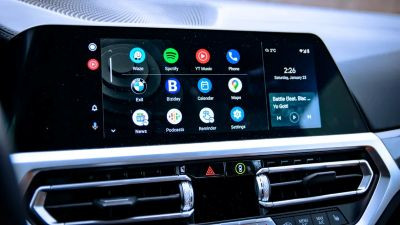
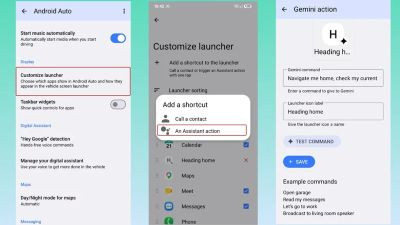
For exactly no good reason, Android Auto pushes about a dozen apps into the home screen. Mine inexplicably had an icon to open Adobe Acrobat and another for IFTTT. Now, don't get me wrong, these are fantastic apps to use on your smartphone, but will I ever use them in my car? Absolutely not! By going to Android Auto > Customize launcher, you can decide which apps stay and which get hidden away. Keep the absolutely necessary there and ditch the rest — there's no good reason to scroll through so many icons if you're not going to use them. Keep the navigation app of your choice, the call and messaging tools and your media playback. That's it.

You can also take this chance to sort the apps however you need them most, pushing those you know you use more often to the top so you can access them more easily. The last thing you want to do is spend unnecessary time scrolling on the car's infotainment screen while you're supposed to be focused on traffic.

Unlock Android Auto's developer settings

Listen, Android Auto offers some great settings to fiddle with, but more are buried away. Developer mode isn't just for engineers, and you can surface hidden options that can help with troubleshooting and customization.

1. Open Android Auto on your phone and scroll all the way down. When you see About or Version at the bottom, tap it around 10 times until a confirmation message appears.

 2. Now you can tap on the three-dot menu at the top and go to Developer Settings.

If you want to ensure Android Auto always connects to your car wirelessly, you can check the box for it. This feature will rapidly deplete your phone's battery, however, and there's some lag you should be well aware of. If you want to stick to a wired connection, you can just uncheck the box. The Developer Settings is also the place where you can go and force video resolution to certain values if you want to ensure everything looks crisp even when the internet is slower.

Force the Android Auto theme

For your Maps app, Android Auto automatically swaps between the night and day modes. If you prefer one or the other, however, back out of Developer Settings and you can force the theme to either one. We get it — dark mode is perfect for night driving; it's easier on the eyes and reduces screen glare, so you might want to use that during the day too.

Ensure Android Auto starts when you get in the car

One of the features you can easily access in Android Auto will ensure the app loads up on your car's infotainment as soon as you get in the car, without having to unlock your phone. That's particularly useful if you use the wireless version since you won't have to dig around for your smartphone. It also means you'll be on your way faster, which can very well be a safety improvement. This works whether your car has native wireless Android Auto access or if you use an adapter. 

Control automatic media playback

By default, once Android Auto connects, your media playback resumes. That's great... most times. Other times, not so much. If you left your volume way up the night before, you could very well get a scare as the music starts blasting. You might also not want your book or podcast to resume automatically in the morning while the kids are loaded up in the car.

To adjust this, open Android Auto, scroll down to Start music automatically and toggle the feature on or off, according to your preferences.

Put Gemini to use

Google's Gemini AI assistant has been available in Android Auto for the better part of the year, as the company will retire its old Assistant this fall. You can get ahead of the switch and change it yourself if you haven't already. Go to Android Auto > Digital Assistant > Manage your digital assistant > Digital assistants from Google and pick Gemini. This is also the menu where you can choose the Gemini voice you want to use, where you can choose to simply talk to interrupt Gemini's ramblings and to give Google's AI more insight into your life for better results (by allowing it to analyze on-screen text and images, for instance).

So how exactly can you put Gemini to use? Well, that's the cool part. Go back to Android Auto > Customize launcher and tap Add a shortcut to the launcher > An Assistant action. You can even leave this on your Android Auto screen if you want to.

Type your desired command for the assistant, give it a name and test it out before saving. One that I have set up is this: "Navigate me home, check my current ETA and text [Husband's name] to say I am on my way and should arrive around [ETA]." This sets my home as the target destination and fires off a WhatsApp message to my husband telling him when I should arrive. You can take things further and ask it to check the traffic on your route, play a specific playlist on Spotify and read you your daily calendar. If you have smart gadgets at home, you can include them in the routine by asking the robot vacuum to run just as you leave for work, or have the thermostat start working so you get home to the perfect temperature. The possibilities are endless, especially since you can add as many of these as you want.

None of these changes require third-party tools or advanced technical knowledge. They're easy to implement and can improve your Android Auto experience quite a bit. They add up to a smoother, safer and more personalized driving experience, and that's exactly what we all want.

source
46
The privacy browser Brave is rolling out email aliases on desktop in the latest update with five aliases available for free.


Brave has announced a big privacy win with the new version 1.94 for desktop that launched on Sunday. Once updated, Brave will offer email aliases to let you sign up for online services without revealing your personal email address. By using aliases, you don't need to risk the leaking of your primary email addresses, which could invite spam to your inbox later on.

According to Brave, your email address is a long-lasting data point and universal identifier. When you share it with websites, it can then be used for tracking your actions across the web. It went on to say:

Quote
“Ad tech companies like Google, Meta, and LinkedIn publicly promote how businesses can upload email addresses to match customers against their own user profiles. While Brave offers best-in-class protections against third-party trackers like Meta Pixel that are embedded on websites, your data can still be shared using techniques like server-side matching.”

What’s good with Brave’s email aliases feature is that it is deeply integrated in the browser so when you go to a website’s sign-up form, you will be given privacy-friendly email aliases to sign up with. These then forward to your real email address, which websites never see. You can also deactivate email aliases that you create so you can cut off any spam that bad actors start sending to you.

To use this feature you will need to create a Brave account, which is separate from a Brave Premium account. Then follow these instructions:

1️⃣ Go to brave://settings/email-aliases and click “Log in or create a Brave account”

2️⃣ Provide your email address and a strong password

3️⃣ Follow the instructions to verify your email

4️⃣ Once you’re logged into your Brave account, simply click into an email field on any website to create an alias.

5️⃣ If the “New Email Alias” hint doesn’t appear, you can right-click the email field and select ‘New Email Alias’ to create one manually.

6️⃣ You can manage all your aliases by going to Settings > Autofill & Passwords > Email Aliases (or directly follow the link at brave://settings/email-aliases).

The email aliases feature will allow you to create five free email aliases. This feature has on-going costs for Brave, so it plans to offer a Premium version in the future. It said that it’s also working to bring this option to mobile. As this is early days, Brave warns that these emails may go to your spam folder while it builds up its reputation score as a mail provider. If they land in your spam, just mark the message as not spam so future emails get delivered properly.

source
47
Microsoft confirms Windows hotpatch devices must restart for September and October 2026 updates, with regular hotpatching resuming in November.

Microsoft announced the availability of hotpatch updates for Windows 11. For those unaware, this allows enterprise PCs enrolled in this program to install a baseline update through a restart once every quarter and not have to restart to apply security updates for the next couple of months. It's a neat little feature that ensures minimal disruption of business processes and workflows. However, Microsoft has now announced that your hotpatch PC will, in fact, restart to apply security updates for the next couple of months.

In Message Center advisory MC1462918, Microsoft has confirmed to IT admins that a restart will be necessary when applying the security updates for September 2026, unfortunately. This is because this update contains some security features for components that necessitate a restart.

This affects all enterprise devices enrolled via Windows Autopatch, Windows 11 hotpatch, and Windows Server hotpatch. After these PCs restart following the application of security updates in September 2026, they will be continue to remain enrolled for future hotpatch updates. No configuration changes are being made to hotpatching itself. And, of course, devices not enrolled in hotpatching are unaffected, because they require a restart anyway, so they won't notice anything different.

There is another catch though. While September 2026 mandates a restart due to the requirements of the security update, it is important to keep in mind that October 2026 will force a restart too, since it is the quarterly baseline release which necessitates a restart anyway.

What this means is that "proper" hotpatch updates will begin in November 2026 next. Microsoft has urged IT admins to inform affected users about this unexpected behavior, review maintenance windows, and actively monitor the deployment of the update once it begins rolling out. It is slightly unfortunate that hotpatch PCs will have to force-restart for the next couple of months, but it hopefully won't result in major disruptions to business activities.

source
48
Rockstar confirms GTA VI will have no microtransactions or generative AI, though the updated GTA Online will likely tell a different stor

Two areas in gaming often rile up many customers, especially in recent years. One is microtransactions in paid games and the other is the use of generative AI technologies. The former is considered predatory by many, while the latter has earned its reputation for the general hate that people have for many AI technologies and their impact on the environment. The good news is that arguably the biggest games of the past few years and the talk of the town, GTA VI, will not feature either of those implementations.

As spotted by GameSpot, Kinda Funny hosts Andy Cortez and Greg Miller asked Rockstar North's co-studio head Rob Nelson about the presence integration of generative AI and microtransactions in the upcoming title. The question was pretty direct, and gamers will be pleased to hear that the response to both of these items was an emphatic "no."

Having no generative AI in your game is a major highlight, especially as enterprise and consumer markets have begun to warm towards the technology. While Epic Games promotes the use of AI in its Unreal Engine development ecosystem, others like Valve require an AI-assisted game on Steam to be explicitly labeled as such and not infringe on existing copyrights.

Microtransactions is a pretty open-and-shut case, though. While people tolerate them in freemium games like Fortnite, they are practically abhorred in paid titles. However, there is one important distinction to understand regarding the topic of microtransactions in GTA VI, or the lack thereof. While the numbered title will not include them at all, and it certainly shouldn't considering its $80 price tag, they will likely be a major component in the unannounced, but inevitable upgraded GTA Online version.

The GTA Online that we have right now is based on GTA V and it is still a major cash-cow for Rockstar's parent company, Take-Two Interactive. It's obvious that the publisher will want to continue that trend with GTA VI's online component too, so don't be surprised to see microtransactions pop up there, once it gets released.

source
49
Social Media / Meta to pay up to $18bn to settle claims its platforms harm children
« Last post by riso on August 27, 2026, 11:24:46 AM »
Social media giant Meta has agreed to a $18bn settlement with US states and territories to resolve claims that Facebook and Instagram harmed children.

A California judge approved the settlement, which Meta must pay to 48 states, plus the District of Columbia and three US territories, marking the company's largest payment over child safety litigation to date.

Meta will also implement a host of changes aimed at better protecting kids online, which the states had demanded, including default daily time limits and night-time blocks.

"This is a major moment to clean up an industry that has been hurting our kids," California Attorney General Rob Bonta said.

Meta has denied any wrongdoing as part of the settlement and said on Wednesday that the payment it agreed to "will be distributed in annual instalments over a 10-year period".

Judge Yvonne Gonzalez Rogers approved the settlement, writing that it "reflects a fair, reasonable, comprehensive, and good faith approach not only to provide monetary relief, but importantly, to change conduct in a way that attempts to meaningfully address the negative impacts of the social media platforms at issue".

Meta's $18bn settlement may hasten reckoning for social media on child safety

While the settlement includes almost the entire US, the initial lawsuit was filed in 2023 by 29 states accusing the company of numerous violations of federal and state child privacy laws.

One of the states that was not part of the settlement was New Mexico.

Last month, a federal judge there handed down a historic ruling against Meta, finding it to be a "public nuisance" on par with air pollution and ordering it to pay combined fines of almost $1bn.

Reuters The blue Meta logo, which looks like an infinity sign, outside Meta's HQReuters
As a jury trial kicked off last week in an Oakland, California, federal court, state lawyers argued the tech company knew that millions of 11- and 12-year-old users were on Instagram and Facebook over the years, yet "did little to keep them off" the platforms.

Although the trial had only gone on for five days, state lawyers relied heavily on information found in millions of internal Meta documents provided in the case. They included internal research, employee emails, and chat logs that went all the way up to chief executive Mark Zuckerberg.

One piece of internal research on Instagram stated: "Teens have an addict's narrative about use." Still, the states argued, Meta targeted young users.

"The trial did not go well for Meta," Bonta said on Wednesday.

Meta maintained throughout the brief trial that it had worked extensively over the years to make its platforms safer for its youngest users, pouring resources into testing and research, and building new features.

"We're always working on teen safety," head of Instagram Adam Mosseri said during an hour of court testimony on Tuesday.

The case was settled and court adjourned before he could reappear before a jury.

Before Mosseri's testimony, a former researcher at Meta, George Volichenko, appeared and with lawyers went over various internal communications he had been a part of regarding Meta's work on safety.

Volichenko said he struggled to understand when he was at the company in 2022 why the team he worked on wasn't given more freedom to better test and implement new safety features.

One of those was "quiet mode", which muted notifications for teen users during the night. His team knew such a feature would be much more widely adopted if Meta turned it on by default.

He recalled his manager telling him he "shouldn't worry too much about the adoption figures being low, because the team exists partially to protect the company against the upcoming lawsuits".

As part of the Wednesday settlement, however, a feature called "night mode", which blocks notifications between midnight and 6am, will now be on by default - meaning they will be turned on automatically. The settings are also designed only to be turned off by a parent or guardian.

"The framework we've negotiated will empower parents to easily manage how their children access our platforms," CJ Mahoney, Meta's chief legal officer, said.

Other features for teen users being implemented as part of the deal include:

A default two-hour daily time limit (cumulative across Instagram and Facebook) that teens can only turn off with a parent's permission.
Likes will be hidden, on teens' profiles and those that they interact with.
"School mode", or a mute on notifications between 08:00 and 15:00 during school days.
Prompts noting when a teen has hit 15 minutes of continual use. Then notifications when cumulative use has hit 60 and 90 minutes.
The ability to choose a feed that is not driven by an algorithm.
The ability to turn off autoplay for videos and content.
Extreme make-up filters will no longer be accessible.
As for the new daily time limit for teen users, that will be reduced to one hour of total daily use should other social media platforms like TikTok, Snap and YouTube also agree to implement new restrictions for young users.

Bonta urged such platforms to do so, saying the settlement with Meta "is a good blueprint" for other companies to follow.

Should they not, he suggested on Wednesday that his office would now be "more focused" on bringing changes to the entire social media industry.

Meta also said TikTok and YouTube should implement the same safety features for their younger users.

"Our new Time Limit commitments, Night Mode features and usage limits during school hours set the right path forward for our whole industry, but this framework will only work if all our peers join us," Meta's Mahoney said.

YouTube and TikTok have been contacted for comment.

District of Columbia Attorney General Brian Schwalb called the Meta deal a "monumental public health victory".

He added: "The safety features Meta is required to install will fundamentally and immediately change how young people use Instagram and Facebook."
Via bbc uk Pic via Google
50
Researchers from the University of Birmingham and Durham University have disclosed a serious hardware-based attack that could allow attackers to bypass key Windows 11 security protections without physically accessing the targeted computer. The researchers presented their findings at the 2026 USENIX Security Symposium, showing how weaknesses in the configuration memory of certain consumer RAM modules can be abused to undermine security mechanisms relied upon by Windows.
The technique, dubbed “Download More RAM,” exploits inadequate write protection on a configuration chip found in some DIMMs, or Dual In-line Memory Modules. This chip stores information that tells a computer how much memory is installed. On affected modules, the configuration can potentially be modified through software because the chip is not sufficiently protected against unauthorized writes.

Altering RAM Configuration Creates Memory Aliases
According to the researchers, modifying the configuration can make a system believe that it has significantly more memory than it physically contains. This can expose additional memory addresses that act as aliases for genuine memory locations.

Through these memory aliases, an attacker may gain access to memory that should normally remain protected by operating system and processor-level security controls.

The researchers demonstrated that the technique could be used to re-enable hundreds of known-vulnerable drivers that had previously been blocked because of their use in malware and ransomware campaigns.

Antivirus and EDR Protections Could Also Be Undermined
The research also demonstrated that memory aliasing can potentially be used to disable antivirus and Endpoint Detection and Response (EDR) software. These security tools continuously monitor systems for suspicious activity and help detect or block cyberattacks.

The researchers further showed that the technique could compromise protections associated with Microsoft’s Virtualization-based Security (VBS), including access to memory enclaves designed to isolate sensitive information.

The attack can also undermine Hypervisor-Enforced Code Integrity (HVCI), a security technology intended to protect Windows against threats even when an attacker has administrator-level privileges.

One-Click Attack Chain Demonstrated
The research team reportedly developed a one-click script capable of automating several stages of the attack, including memory aliasing, rebooting the system and disabling antivirus protections. According to the researchers, the process does not require user interaction, raising concerns about the possibility of automated and large-scale exploitation.

The researchers surveyed popular consumer DDR4 and DDR5 memory modules and found that at least one product line from Corsair, G.Skill and ADATA had configuration chips without complete write protection.

The study estimated that these three manufacturers collectively account for about 55% of the high-performance consumer memory market and more than 70% of the gaming segment.

By contrast, modules from Crucial, Kingston and HyperX, along with some G.Skill product lines, were found to use partial write protection that was sufficient to prevent the demonstrated attack.

Microsoft Assigned CVE-2026-23670
The researchers followed coordinated disclosure procedures and informed affected vendors before making their findings public. Microsoft acknowledged the vulnerability, assigned it CVE-2026-23670 and released mitigations through its April 2026 security updates.

Windows systems with Secure Boot enabled are currently protected against the demonstrated form of the attack. Systems running without Secure Boot, however, may remain vulnerable.

The researchers have therefore advised users and organizations to verify that Secure Boot is enabled and to apply the relevant Microsoft security updates.

Memory Vendors Also Introduce Mitigations
Corsair has added functionality to its iCUE software that allows users to enable write protection on compatible memory modules after installation, providing a hardware-level mitigation.

The HWiNFO utility has also incorporated similar functionality for compatible modules from other manufacturers. In addition, some motherboard manufacturers provide BIOS settings that can block write operations to memory configuration chips, offering another mitigation option.

A University of Birmingham researcher warned that strong operating system security ultimately depends on the integrity of lower-level system components. If an attacker can compromise a lower layer, protections implemented above it may also be put at risk.

The findings highlight that protecting Windows systems requires more than software updates and antivirus tools alone. Organizations using potentially affected hardware should verify Secure Boot status, install Microsoft’s security updates and enable hardware-level write protection where supported.
Via 420.in @ Pic via Google
Pages: 1 ... 3 4 [5] 6 7 ... 10