Recent Posts

Pages: 1 2 3 [4] 5 6 ... 10
31


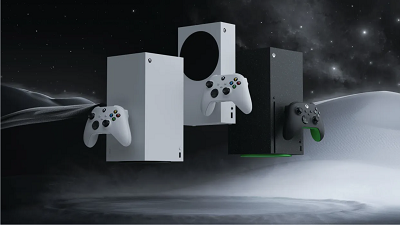
Despite some recent PR wins, like a focus on exclusivity, Xbox has faced a motley of controversies thanks to its volatile restructuring. This shedding has led to hundreds of layoffs and studio reorganization over the last few months, and more firings are yet to come.

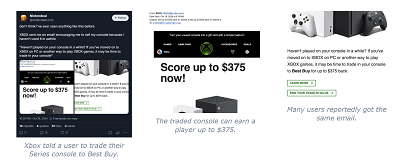
The company is now facing another wave of backlash after multiple users began receiving emails that effectively ask them to sell their unused Series consoles.

Xbox wants these users to trade in the devices to third-party retailers like Best Buy for up to $375.   

Why it matters: Xbox’s request aims to curb the ongoing supply issues, as Series X|S consoles haven’t been stocked in many parts of the world for a long time. However, this controversial incentive could push many players out of the ecosystem.


Nintendeal on Bluesky first reported this strange development. The user received an email directly about selling their console because it hadn’t been used in a while. Other users confirmed they received similar messages from Xbox.

It would have been understandable if a retailer like Best Buy emailed users, but the trade deal comes straight from Xbox. In other words, the company doesn’t mind parting ways with you if your Xbox Series X|S console is not being used enough.

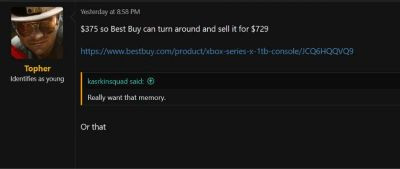
Xbox users are especially upset because you can only get up to $375 from this trade deal, but Best Buy would sell a refurbished Xbox Series X|S console for up to $729 instead. So, many argue it’s not worth it to trade in your Series X|S regardless of how much it’s used.


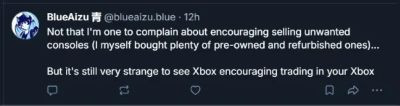
Regardless, some users argue it is a clever tactic for Xbox to ensure traded consoles are resupplied to users who engage with the ecosystem.

source
32
Mac OS X / First Release Candidate for macOS 27.2 Golden Gate now available
« Last post by javajolt on October 21, 2026, 07:28:32 AM »


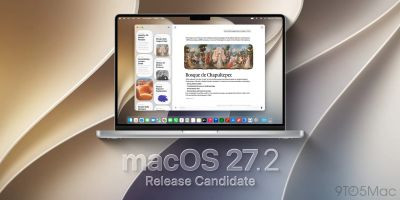
Apple is rolling out the first RC for macOS 27.2 for developers and users enrolled in the public beta, ahead of the official release in the next few weeks. Here’s what to expect.

macOS 27.2 Golden Gate nears launch

After releasing macOS 27.2 Golden Gate beta 4 last week, Apple is now rolling out the first Release Candidate ahead of the system’s official launch in the coming weeks

macOS 27.2 adds support for five additional languages for Siri AI: French, Japanese, Korean, Portuguese, and Spanish. The feature launched last month with English-only support, with Apple promising to expand language availability during its Surprise and Shine event.

One interesting under-the-hood addition in macOS 27.2 is new gesture recognition tools in several built-in apps, which could be laying the groundwork for Apple’s upcoming touchscreen MacBook Pro, expected to be announced later this month at the Pro and Tell event.

One particularly frustrating bug reported in beta 4 causes windows in Electron-based apps to randomly stop responding to dragging attempts. Restarting the Mac temporarily resolves the issue, but it can eventually return.

The build number for macOS 27.2 release candidate 1 is 26B118. We are digging through the system and will report back if we find any noteworthy tidbits.

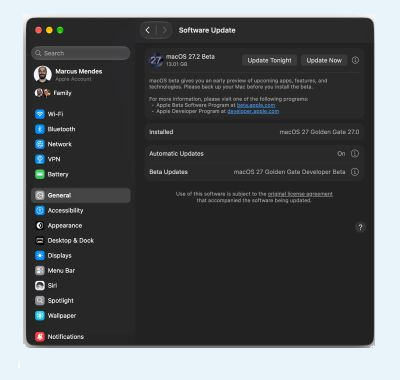
Installing macOS 27.2 RC


Here’s how to install the first macOS 27.2 RC:

   • Back up your Mac

   • Open System Settings

   • Go to General ⇾ Software Update

   • Click the ‘i’ icon next to Beta Updates

   • From the dropdown menu in the top-right, select the macOS Developer Golden Gate Beta

   • Hit ‘Done’

source
33
Microsoft / Microsoft To Block ReFS-Formatted USB Drives And External Storage
« Last post by javajolt on October 21, 2026, 07:13:31 AM »


Microsoft has announced that Windows will begin blocking ReFS-formatted USB drives and external storage devices by default starting January 2027, as part of a broader effort to improve operating system security. The change will affect Windows 11, supported Windows 10 installations, and Windows Server, although the vast majority of users are unlikely to notice any difference.

According to an official Microsoft support document, published on October 13, 2026, the company is introducing new restrictions on how Windows handles removable storage devices formatted with the Resilient File System (ReFS).

Microsoft Is Tightening Security Around ReFS, With External Drives Set To Be Blocked By Default In January 2027

For those unfamiliar, ReFS is Microsoft's relatively modern file system, designed primarily for enterprise and server environments. Compared to the widely used NTFS (New Technology File System), ReFS offers several advantages, including improved data integrity, greater resilience against corruption, support for extremely large volumes, and features such as block cloning that can significantly accelerate certain file operations.

Microsoft has also expanded its use beyond servers, notably introducing ReFS-based Dev Drives in Windows 11 to improve performance for development workloads.

However, ReFS has never officially supported removable storage devices, including USB flash drives and external HDDs or SSDs. Although Windows has generally allowed users to mount such volumes, Microsoft is now moving to restrict these unsupported configurations.

The rollout will take place in two phases:

> October 13, 2026: The initial security update introduces auditing by default. Windows records affected ReFS volumes in Event Viewer under Event ID 524, but continues allowing them to mount.

> January 2027: The enforcement phase begins, with Windows automatically preventing affected ReFS volumes from mounting unless an administrator explicitly overrides the restriction.

More importantly, this change does not erase the contents of affected drives. However, users may find themselves unable to access their files through Windows once the restrictions take effect.

Microsoft says the decision is intended to reduce exposure associated with unsupported storage configurations, although it has not identified a specific vulnerability responsible for the change.


Microsoft's Resilient File System (ReFS) was designed to improve data integrity, resilience against
corruption, and storage scalability. However, Microsoft has never officially supported ReFS on
removable storage devices, and Windows will begin blocking affected external volumes from
mounting by default starting January 2027.


Here's What Affected Windows Users Can Do

Fortunately, the change should have little impact on typical consumers. USB flash drives and external storage devices generally use FAT32, exFAT, or NTFS, none of which are affected by this particular restriction.

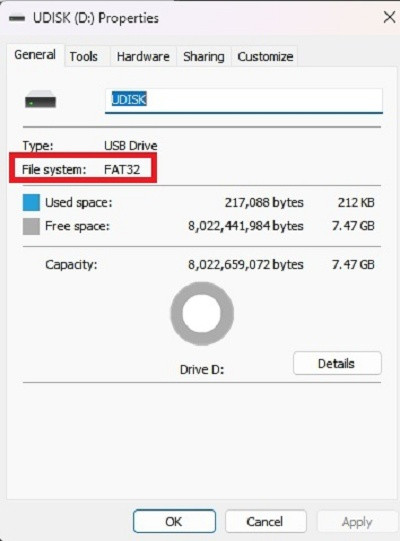
Those using ReFS-formatted external storage should consider transferring their files to a supported configuration before January 2027. Users can check their drive's file system through the Properties menu in Windows File Explorer.


Checking a USB flash drive's file system under the Properties menu of Windows Explorer.

For advanced users and system administrators, Microsoft has also introduced a configurable registry and Group Policy setting called RefsRemovableDeviceMountPolicy.

This setting supports three values: 0 disables the restriction, 1 enables auditing, and 2 blocks affected volumes. Any configuration changes require a system restart, while Group Policy takes precedence over local registry settings.

Although Microsoft provides a way to override the restriction, migrating affected workloads to supported storage remains the recommended long-term solution.

For most Windows users, January's change will pass unnoticed. Nevertheless, enthusiasts and administrators relying on ReFS-formatted external drives should prepare accordingly to avoid unexpected accessibility issues.

source
34
Digital buyers can jump into the sixteen-mission storyline across global locations now, ahead of the full multi-platform release on October 23


Campaign early access is now live for Call of Duty: Modern Warfare 4 for anyone who has placed a digital pre-order or pre-purchase. The early access gives you access to the game’s entire campaign.

The MW4 campaign takes place over sixteen missions across the Korean Peninsula, Paris, New York, and Mumbai. In it, a new invasion threatens peace, and Captain John Price “goes on the hunt for the one pulling the strings.” In this game, you play as Private Park Hyun Jun and his squad fight against a full-scale invasion across the Korean Peninsula.

Early access to the campaign is available to players who digitally pre-order or pre-purchase the Standard or Vault Edition across platforms such as Xbox, PlayStation, Battle.net, Steam, and Nintendo Switch 2. It will run until the game’s full launch on October 23.

In addition to the campaign early access now, there will also be DMZ early access starting on October 20.

To encourage people to jump into the campaign, there are completion rewards that can be earned as players progress through the various missions. All of the items will be available for use in Multiplayer and DMZ when the game launches on October 23. The items available, in the following order, are:

   • “Cho” Base Operator

   • “No More Rules” Calling Card

   • Double XP Token

   • “Dallas” Base Operator

   • “Ready Line” Loading Screen

   • “Luca” Base Operator

   • “Gone Dark” Emblem

   • “Oh-Ji” Base Operator

   • Double XP Token

   • “Kal” Base Operator

   • Double Weapon XP Token

   • “Dunn” Base Operator

   • Double Weapon XP Token

   • “West” Base Operator

   • Double XP Token

   • “Park” Base Operator

Players can also use social features during early access, like crossplay-enabled squads that let you team up with players on other platforms, and you can add friends in-game with the Activision IDs to squad up faster. You can read more here.

source
35
Activision had already announced previously that the Modern Warfare 4 campaign will be playable with advanced access.


Infinity Ward is about to finish off its rebooted Modern Warfare storyline with the upcoming entry, but the game is also dropping with other game modes. Call of Duty Modern Warfare 4 not only has multiplayer, but DMZ is also coming back as an extraction shooter mode. Today, Activision announced that this mode will also be available early as a pre-order bonus.

This is the second major bonus being offered to those who pre-order the game. Activision had already announced previously that the Modern Warfare 4 campaign will be playable with advanced access too, and now, the DMZ is incoming as another addition.

For those who aren't familiar with the mode, it's a returning one from Modern Warfare II. This version will bring in 20 squads of up to three players into a massive map where they can scavenge for loot, play story missions, and complete objectives. Successfully extracting will net the looted items for players to sell or equip for future runs.

Like with other extraction shooters, both computer-controlled and other players are present in the map, increasing the danger of staying for longer or getting into firefights that could draw in more opponents.

There is now a Forward Operating Base (FOB) that players will return to in between runs. This is where players can customize the playable character, sort the acquired loot, craft new gear, get new objectives, and expand the base as they level up. Find all the information about this base and how it functions by reading this FOB deep dive blog.


Pre-loading for the PC version will begin on October 15. Campaign advanced access for pre-purchasing players will open up on the next day, October 16. The new DMZ pre-order benefit will unlock on October 20. Both standard and Vault editions come with these bonuses.

Call of Duty: Modern Warfare 4 launches on October 23, 2026, on PC (Steam, Xbox, Battle.net), Xbox Series X|S, PlayStation 5, and the Nintendo Switch 2. Pre-orders are open now, and Xbox players even have a special weapon skin benefit.

source
36
The Modern Warfare 4 PC version has its own lead developer this time too, with Beenox taking on the duties.


Activision and Infinity Ward are just weeks away from launching Call of Duty: Modern Warfare 4, the final entry in the wildly popular sub-series. Today, the latest developer update gave its full focus towards the PC version, offering details on what's special about it and what players can expect to see at launch.

The Modern Warfare 4 PC version has its own lead developer this time too, with Beenox taking on the duties of "delivering the best experience possible across a wide variety of setups."

Here are some PC-specific features that Modern Warfare 4 will ship with:

• Optimized Hardware Support: Modern Warfare 4 runs on most hardware while also seamlessly scaling up to crisp graphics and ultra-smooth, high FPS gameplay on higher-end setups. The game automatically configures settings based on your hardware.

• Display Optimization: From 4K to 1440p to 1080p, from standard to Ultrawide, expect support for displays of all shapes and sizes.

• Cutting-Edge Upscaling: Choose from a range of upscaling and frame generation technologies including AMD FSR Redstone, NVIDIA DLSS 4.5, Intel XeSS 3, and Filmic SMAA T2X.

• RICOCHET Anti-Cheat: A Multi-layered Anti-Cheat system combines server-side detections, hardware-based protections such as TPM 2.0 and Secure Boot integration, deep investigations, and legal action to combat the cheating market and keep gameplay fair. In addition to RICOCHET Anti-Cheat, expect account security with 2FA and email verification.

• Sub-frame mouse polling: Increased mouse precision for aiming, in addition to support for a variety of input devices.

Moreover, a new field of view enhancing technology that increases the view near the edges of the monitor while keeping the center unaffected is coming to the PC version. Also included is HDR10+ GAMING support, new graphics settings for tweaking, a built-in benchmarking tool, and shader preloading (on the Xbox PC app) to not waste time compiling them at startup.

Another big change is that players won't have to restart the game when updates happen at boot, meaning they can jump into the title without going through loops of starting up the game like in previous games.


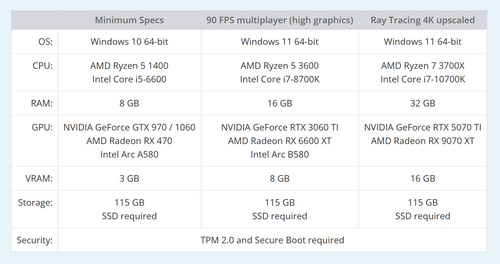
Here are the official system requirements:


Click Image to Enlarge

Call of Duty: Modern Warfare 4 launches on October 23, 2026, on PC (Steam, Xbox, Battle.net), Xbox Series X|S, PlayStation 5, and the Nintendo Switch 2. Pre-orders are open now, and Xbox players even have a special weapon skin benefit.

Pre-loading for the PC version will begin on October 15. Campaign advanced access for pre-purchasing players will open up on the next day, October 16.

source
37
Android O.S | Apps / Your Android phone is moving deeper into Windows 11
« Last post by javajolt on October 17, 2026, 08:19:19 PM »
Messages, apps, and phone controls are getting closer to your desktop.


Quote
■ Microsoft has detailed deeper phone integration across Windows 11’s Start menu, Quick Settings, and dedicated chat windows.

■ Users can preview messages, reply to conversations, and silence or ring their phones, with additional app and file features on supported Android devices.

■ Microsoft hasn’t shared a specific release date for these phone features, and availability will vary by device and mobile platform.


Phone Link already saves you from reaching for your phone during a busy workday, but Microsoft wants that convenience to feel like part of Windows itself. An earlier report outlined that ambition, and phone controls surfaced in Quick Settings this month. Now, Microsoft has officially detailed its next steps.

In its latest Windows 11 announcement, Microsoft describes tighter phone integration across Start, Quick Settings, and individual app windows. The appeal is straightforward: check what needs your attention, address it, and return to work without constantly switching between physical devices.

The Start menu will let you preview messages and notifications from a linked Android phone or iPhone. When something needs a response, you can open the conversation in a dedicated chat window. Microsoft’s accompanying video also shows a Messages interface with a conversation list, group chats, and options for sharing photos and GIFs.


That gives us a clearer look at the messaging experience discussed in July, though Microsoft’s announcement doesn’t say whether it will ship as a separate, installable app.

Meanwhile, Quick Settings will let you silence your phone or make it ring from within easy reach. Misplacing your phone around the house should be less disruptive when you can trigger its ringer from your PC.

Android owners with supported devices get more flexibility. You can open phone apps in separate, resizable desktop windows, browse phone files through File Explorer, and open newly captured photos from a PC notification. The video also shows how to send a file from the PC to the phone.

Microsoft additionally highlights Resume, which lets you continue supported activities across devices. These capabilities build on the existing Phone Link experience, with easier access at the center of the pitch.

The remaining question is timing. Microsoft says its broader Windows improvements are starting to roll out, with more to come, but it gives no specific release date for these phone features. You’ll also need compatible hardware, and the available features will differ between Android and iPhone.

source
38


When you buy a Steam Deck, the beauty isn't just its portability; it's also that you don't have to be locked into playing directly on the ecosystem if you're a multi-platform gamer. That's because the Steam Deck has nifty unofficial apps you can download through Discover Software Center in Desktop Mode that stretch its capabilities. These apps let you access games you've bought from other launchers, and some you couldn't get natively, like your PlayStation 5 library and your phone.

However, for your Steam Deck to play PS5 games, you must own a working console. Plus, you need to download the Chiaki4deck app (also called Chiaki-NG) and enable Remote Play on your console, since you won't use the Steam Deck to access your library directly. Instead, you'll stream, so you need a stable connection for smooth performance.

Lastly, Steam Deck controls translate fairly well to a PS5 DualSense controller automatically (you can also configure this during the Chiaki4deck setup); the trackpads on the Steam Deck mimic the PS5 DualSense's touchpad and PlayStation button. For extra customization, consider remapping it yourself or downloading a community template.

How to set up Chiaki4deck to stream your PlayStation 5 games


To stream your PlayStation 5 games from the Chiaki4deck app, both your Steam Deck and console must be on the same network. You can do this remotely by port forwarding (the old way) or using the "Remote Connection via PSN" option if your app is v1.7.0 or later. During initial setup, keep them on the same network to ensure they link properly (you only need to do this once).

First, open Desktop Mode on your Steam Deck by holding down the power button. Once you're in Desktop Mode, open the Discover Software Center and search for "Chiaki4deck or Chiaki-NG." Select it to download and install it. After installing the app, you can optionally create a non-Steam game and remap the controls — this step is recommended.

The next step is to register your PS5 console in the Chiaki4deck app. The app should prompt you to do so during initial setup. Just note that you'll also need to do this on your console, since it requires entering a PIN to link your devices through the PlayStation Remote Play menu (navigate to "Settings" > "System" > Remote Play"). Once you start Chiaki4deck, you should see a window with a Register button that prompts you to enter the PIN, your PSN account ID, and Host. The latter should auto-populate if you're on the same network and logged into your PSN account; otherwise, you may need to use a public lookup tool. After registering, open the Chiaki4deck app in Game Mode, select "Play," to connect to your PS5 while it's on or in Rest Mode (it must be configured to stay connected to the internet in Rest Mode settings).

What to do if you don't have a PlayStation 5


As great as it is to turn your Steam Deck into another device for streaming your PlayStation 5 games, it isn't very helpful if you don't own the console or yours isn't working. Also, the experience depends on your connection; a poor network means more latency while streaming. As such, you have only a few options. One, you can just buy some of Sony's ported titles directly. Great options include "God of War: Ragnarök," "Ghost of Tsushima: Director's Cut," and "Horizon Zero Dawn," which perform well on the Steam Deck. You can view a full list of Sony titles through PlayStation Studios' Steam page.

The second option is "technically" emulation (emphasis on the quotations). However, this one isn't recommended since the emulator is still in its early stages, meaning it's a work in progress and remains experimental. If the project interests you, you can check out SharpEmu, which supports Windows, Linux, and macOS. Currently, the emulator supports only a few titles, and much less so on the Steam Deck.

The first "working" emulated title for the Steam Deck is "Astro Bot," but it's more of a proof of concept, showing only the title and loading screen at 0.5 to 1 FPS. The other major downside is that most titles won't be viable, as the hardware doesn't come close to a PS5 without rigorous tuning. If anything, this might become more of a job for the Steam Deck 2 when Valve announces and releases it.

source
39
Android O.S | Apps / This Free App Lets You Play Your Steam Games From Your Phone
« Last post by javajolt on October 17, 2026, 02:49:44 PM »


Part of the beauty of Steam libraries is that they aren't tied to a single device, and many Steam users enjoy their collections with PCs and Steam Decks alike. But what about when you want to game away from your computer and don't have a Steam Deck (or if your Steam Deck is just out of battery)? That's when playing Steam games on your phone comes in, and there's a free app that lets you do just that: Moonlight Game Streaming.

Moonlight is an open-source app that lets you play your PC games on your phone, as well as a host of other supported client devices. Since your experience with the app will largely depend on the limitations of your internet connection, you'll want to ensure your network is strong enough to handle remote play. We recommend wiring your internet connection with a good Cat6 Ethernet cable to get the best data transfer speeds — and therefore the lowest latency — as you possibly can. If your hardware of choice can support it, Moonlight even lets you stream in 4K at 120fps and HDR using a piece of open-source software called Sunshine.

Previously, Moonlight used Nvidia GeForce Experience as a stream host, but GeForce has since been phased out and replaced with the new Nvidia App, which doesn't support GameStream. GameStream was Nvidia's proprietary protocol designed to stream high-performance PC games from a computer. It used Nvidia GPUs to get the job done, and it was designed for use with the Nvidia Shield streaming box. But eventually, Nvidia retired this streaming tech, which led the community to create Sunshine as a replacement stream host. Conversely, Moonlight is the streaming software used on receiving client devices — like cell phones — to display games streamed via Sunshine. Using these tools, you can access specific applications designed for streaming, such as Steam's Big Picture Mode.

How to get started with Moonlight Game Streaming


Setting up Moonlight Game Streaming on your phone is fairly simple. First, you'll have to install Sunshine on your host device, which should be your PC. You can install it directly from LizardByte's GitHub repository or through Lizardbyte's official website. Your phone will then require the Moonlight app, which you can find on both Google Play and the App Store as "Moonlight Game Streaming." The Android app should be published by Cameron Gutman, while the iOS app will list Diego Waxemberg as the developer. You can also navigate to the official Moonlight website's "Client downloads" tab in the main navigation menu to access app downloads for various platforms, including all major desktop and mobile operating systems, Amazon Fire OS, and even Nintendo Switch Homebrew.

Once you have Sunshine and Moonlight installed on your PC and phone respectively, you can begin setting them up. Moonlight's setup guide on Github provides detailed instructions for how to configure your software under various circumstances. One of the main considerations is that both your host and client devices need to be connected to the exact same network. The whole process shouldn't take long — all you're really doing is configuring your PC as a Sunshine server, then connecting it to the phone that's mirroring your game via Moonlight. The official documentation also strongly recommends creating a Sunshine account when you first pair your host device with the mobile app; otherwise, anyone who happens to gain access to your Sunshine configuration could use your computer remotely by adding their own client devices to it.

Optimize Moonlight Game Streaming on your phone


Even with a hardwired internet connection on your host PC and a 5GHz router — if you have a 2.4GHz router, you'll likely experience significant latency — you'll still want to tweak a few settings to optimize your experience and ensure your host PC is up to snuff for stable server performance. On Windows, under Control Panel > Hardware and Sound > Power Options, setting your PC to high-performance mode instead of balanced mode or energy-saving mode may help reduce stuttering during streaming. You can also follow guidance in the "Advanced Usage" section of the Sunshine documentation to adjust your Sunshine configuration file as needed.

You may also have to configure the controller input values to match your gamepad. If you want to use special controllers like steering wheels, you'll have to download a separate software tool, such as VirtualHere, for it to work. If you're using a phone to game, however, you're likely also using an Android or iOS-compatible gamepad; you generally shouldn't have any issues using a Bluetooth-enabled game controller with the Moonlight app.

Don't forget to adjust the video resolution, frame rate, and bitrate values in the Moonlight app — but before selecting 4K video at 120fps, check whether your device's chipset supports those settings. This is important because the Moonlight app is what decodes the video stream from your PC. If you try running a game at a resolution that your phone can't handle, you'll experience poor framerates, regardless of how powerful your host machine and network connection are. If you're using an Android and aren't sure about which video settings to apply, you can test different frame pacing options, such as "Prefer lowest latency" or "Prefer smoothest video," to see which one delivers the best experience for you.

source
40
'Microsoft and/or Xbox have been removed as BDS boycott targets'

"We've made this decision with the belief that meaningful change can be made in the world."


(Image credit: Panic)

"We have made the decision not to release Big Walk on Xbox, in accordance with the Palestinian-led BDS (Boycott, Divestment, Sanctions) movement's call to boycott Microsoft, and their designation of Microsoft Games (and Xbox) as a priority boycott target." via a social media post


Big Walk is the most fun I've had in a co-op game all year, perhaps for a few years; it's certainly at the top of my list for greatest games to play with friends. I'm not the only one who thinks that, just ask about anyone on the PC Gamer team or the other million players who picked the game up in its first week. But not everyone's had the chance to check it out as developer House House confirms that Big Walk still won't be coming to Xbox anytime soon.

"It has always been our intention for Big Walk to be played by groups of friends, and we know that keeping the game off Xbox runs counter to those intentions," House House says. "This decision means that some people will miss out on playing Big Walk with their friends, and we understand the disappointment we're causing. We are disappointed too. We would love for people to be able to play the game on Xbox, but not until Microsoft and/or Xbox have been removed as BDS boycott targets."


(Image credit: Panic)

It's a tough decision but one that ultimately has its merits. Just last year it was revealed in a report that the Israeli military was using customised and specialised subset of Azure, provided by Microsoft, to store data from intercepted telecommunications in Gaza and The West Bank. This led to employee protests and Xbox being added to the BDS boycott targets.

"We've made this decision with the belief that meaningful change can be made in the world," House House adds. "That coordinated collective action can confront even the most powerful interests, and that one day. Palestine will be free.

House House told players curious about its motives to check the BDS campaign's own explainer as to why it is targeting Xbox and Microsoft. It also recommended reviewing "the successes this kind of pressure has already had on Microsoft, and especially, watching this great introductory piece by People Makes Games."

source
Pages: 1 2 3 [4] 5 6 ... 10