Exposing a wider firmware problem The CA 2023 revocation update turned a background security feature into a massive headache for
PC users and hardware vendors alike.Secure Boot has been part of the PC ecosystem since 2011, but 2023–2025 finally pushed it into the spotlight, and not in a way Microsoft, OEMs, or firmware vendors might have liked. What was once a quiet, behind‑the‑scenes security feature suddenly became a front‑page story. Indeed, as the
CA‑2023 certificate rolled out, it exposed long‑standing inconsistencies in firmware implementations, certificate handling, and update pipelines across the PC industry. To be both brief and brutal: it was neither pretty nor fun.
For Windows users, the result was a confusing mix of disturbing stuff. This included boot warnings, broken boot chains, and inconsistent or incoherent vendor guidance. The prevailing general sense was that Secure Boot, introduced to increase trust and reliability, had instead become a source of uncertainty and confusion.
This article unpacks the story of what Secure Boot is, how it works, why CA‑2023 matters, how vendors stumbled, and what users can do when Secure Boot updates fail. Along the way, I’ll explain every acronym, walk through the trust chain step‑by‑step, and offer practical guidance based on real‑world troubleshooting. I’ve just completed a grueling, if not epic, journey to get my small fleet of PCs (ranging in size from 10 to 15) fully secure boot-compliant and running from the CA 2023 boot certificates. It’s been quite a trip, and taught me more than I ever wanted to know.
What is Secure Boot and why is it important?Secure Boot is a feature defined by the Unified Extensible Firmware Interface (UEFI), Intel’s modern replacement for legacy BIOS. Its purpose is to
ensure that only trusted, signed bootloaders and operating system components can run during system startup.
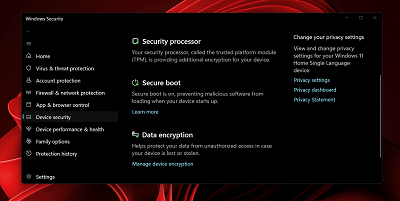 The Windows Security dashboard showing Secure Boot active
To accomplish this, Secure Boot relies on a set of cryptographic keys stored in firmware. These keys define what is trusted, what is allowed, and what is explicitly forbidden.
Here are the key components:
Platform Key (PK)The Platform Key establishes the system owner. Whoever controls the PK controls the Secure Boot configuration. Typically, OEMs install their own PK at the factory.
Key Exchange Key (KEK)The Key Exchange Key authorizes updates to the Secure Boot databases. Microsoft, OEMs, and sometimes enterprise administrators maintain KEKs. A valid KEK is a ticket that permits a third party to apply updates to certificates and databases maintained in UEFI.
Allowed Signature Database (DB)This database contains hashes and certificates for trusted bootloaders and OS components. If something invokes a signature present in the DB, the firmware allows it to run.
Forbidden Signature Database (DBX)This is the “revocation list.” Anything in the DBX is explicitly blocked — even if it was once trusted. DBX updates are how the industry revokes compromised bootloaders. The original CA-2011 got the whole Secure Boot thing started; MS plans to revoke this later in 2026. The CA-2023 will replace it, and is slowly but surely rolling out via Windows Update and OEM UEFI updates.
Why is Secure Boot important?Secure Boot is designed to stop rootkits, bootkits, and other pre‑OS malware. If attackers can compromise the boot chain, they can hide from the OS, evade detection, and maintain persistence indefinitely. They will keep coming back because they operate outside and independently of the OS. Secure Boot puts a stop to such shenanigans.
In theory, Secure Boot is a clean, elegant solution. In practice, the Secure Boot ecosystem is messy, fragmented, and full of edge cases.
However, Secure Boot is both more important and more binary than ever. On the plus side, when it works, it works well. On the minus side, when problems present, they can be challenging, vexing, and time-consuming.
The Secure Boot compromise that triggered CA-2023In early 2023, Microsoft announced a major security issue where older Windows Boot Manager binaries had been compromised in ways that could allow bypassing Secure Boot. To mitigate this, the company issued a new DBX update called the CA‑2023 revocation. This update added vulnerable bootloaders to the forbidden list and provided a new, signed boot loader with a matching certificate that was immune to such attacks and issues.
Why was this necessary?Attackers had discovered ways to exploit older bootloaders to disable Secure Boot protections. Revoking those binaries proved essential to maintaining the integrity of the ecosystem.
Why did this break systems?Many OEMs had:
• outdated firmware
• inconsistent DB/DBX handling
• broken update pipelines
• non‑standard Secure Boot implementations
• incomplete or incorrect key sets
• firmware that silently ignored DBX updates
• firmware that bricked systems when DBX updates were applied
In other words, the revocation exposed years of technical debt. In many cases, attempting updates was enough to impact PCs. In the best case, impacted PCs might not be able to restart (warm boot through the Power > Restart selections in the Start menu). Worst case, impacted PCs might be unable to boot, or even to access UEFI after powering on. Bad news!
Post CA-2023 ResultsMillions of systems ended up in one of these states:
• Secure Boot enabled but not actually enforcing revocations
• Secure Boot disabled because updates failed
• Secure Boot stuck in “User Mode” with mismatched keys
• Systems unable to boot after DBX updates
• Firmware that refused to apply the CA‑2023 update at all
This was not a Microsoft‑only problem. It was an ecosystem‑wide failure. Obviously, this turned Secure Boot into a travail for users with systems that exhibited one or more of such issues. For my own part, one of my ASRock B550 Extreme4 based Ryzen 5 PCs exhibited most, if not all, of these failings. Eventually, I had to replace the motherboard to get past them.
How does the “Secure Boot Chain” work?To understand why CA‑2023 caused so much trouble, it helps to walk through the trust chain step‑by‑step.
Step 1: Firmware validates the PKIf the PK is valid, the system knows who “owns” the platform.
Step 2: Firmware validates KEKsThese keys authorize updates to DB and DBX.
Step 3: Firmware loads DB and DBXThese define what is allowed and what is forbidden.
Step 4: Firmware validates the bootloaderIf the bootloader’s signature matches an entry in DB and is not in DBX, it runs.
Step 5: Bootloader validates OS componentsWindows Boot Manager checks signatures on winload.efi, drivers, and other early‑boot components.
Step 6: OS boots with trust intactIf everything checks out, Windows loads normally.
Alas, lots of steps pose ample opportunities for things to go sideways. That’s what makes this approach somewhat fragile and occasionally prone to hang-ups or outright failure. Things can break or fail if any one of the following cases presents:
• DB is missing a required signature
• KEKs are outdated
• PK is incorrect
• Firmware mishandles updates
• Bootloaders get mismatched (Windows maintains a separate copy in the C:\Windows folder hierarchy, while another instance gets used from the EFI partition)
If any such item presents, Secure Boot may fail or fall back. It may also silently fail to enforce its security regime. Thus, for example, I found myself in a situation where every boot presented a message that (falsely) reported a “CPU change” and asked to confirm current or roll back to previous TPM security settings. Here’s what that looked like:
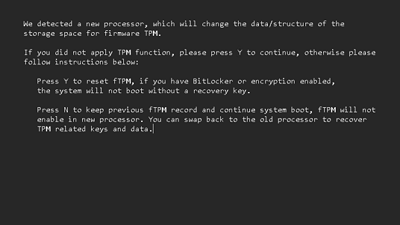
It’s a known quirk of the ASRock B550 Extreme4 UEFI that it reports a processor change even when Secure Boot changes or updates occur. For about two weeks, in fact, I had to enter “N” on this screen every time I rebooted my system to get to the Windows desktop. This made each reboot take at least 2-3 minutes, and bothered me no end.
Common Secure Boot issues across different Motherboard vendorsThe CA‑2023 rollout revealed that different vendors had wildly different levels of firmware discipline. Some desktop and laptop PCs sailed through without problems; others experienced anything from minor setbacks to major issues up to an including unbootable systems. Let’s take a look at how various vendors fared in this situation.
ASUSSome ASUS boards refused to apply DBX updates unless Secure Boot was temporarily disabled — a paradoxical requirement. Others applied updates but left systems in a “half‑revoked” state. The CA-2011 certificate might still be used (or not) even if the CA-2023 certificate was present.
MSI • Some (but not all) MSI boards were notorious for:
• inconsistent DBX handling
• firmware that silently ignored updates
• Secure Boot modes that didn’t match UI labels
• systems that reverted to factory keys unexpectedly
ASRockASRock boards often required manual intervention for such things as:
• clearing keys
• reinstalling factory defaults
• re‑enrolling Microsoft keys
• manually applying DBX updates
Their documentation was sparse, and many users were left guessing. In my own case, I had two supposedly identical motherboards, both B550 Extreme4 models. One of them surrendered to manual, and Microsoft WU supplied updates. The other could never reconcile the pending updates from the OS (both WU and manually applied) to the contents of the various firmware databases. Indeed, that’s what provoked the ongoing series of “CPU change” warnings depicted in the previous section of this story.

