It seems that certain Windows 7 users are experiencing problems when running uTorrent. Reports suggest that uTorrent is exceeding memory limits (sometimes reaching the 100% mark), download stops at 99.9%, false reports are produced and so on. In short, uTorrent performance is not up to the mark when running uTorrent with Windows 7. Well
AddictiveTips has come up with a potential fix for this problem. We have listed the steps that will solve the problem
How to Fix the Windows 7 uTorrent problem
Following are the steps that will help you in optimizing the uTorrent performance for Windows 7:
- Right click uTorrent icon, click on the Properties to open the Property Sheet
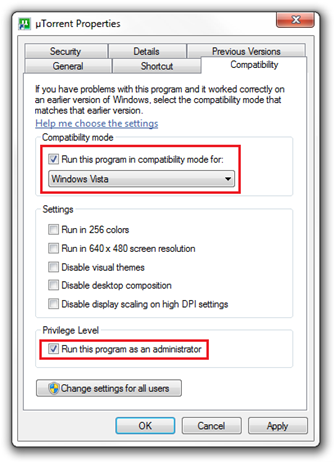
- Navigate to the Compatibility Tab
- In the Compatibility mode panel, select Windows Vista
- In the Privilege level, Check the "Run this program as an administrator" option
- Open the uTorrent app, Go to Options Tab and click on the Preference option.
- Now access the Disk Cache option located under the Advanced branch

- Check "Disable Windows caching of disk writes"
- Check "Disable Windows caching of disk reads"
- Click Apply button
Also please make sure that uTorrent is added to Firewall Exception
Source: ithinkdiff.com

