Microsoft is moving more and more of the old system control entries to the settings. Of course, it's an advantage when everything is in one place. But you also have to change your workflow accordingly and get used to it.
In the new Insider, the Programs and Features entry from the Control Panel has not been removed, but it now leads directly to Settings -> Apps -> Installed apps. The entry in the control panel was interesting for the installed updates. But even if you enter AppUpdatesFolder in Windows key + R shell: AppUpdatesFolder, you now end up in the new settings.
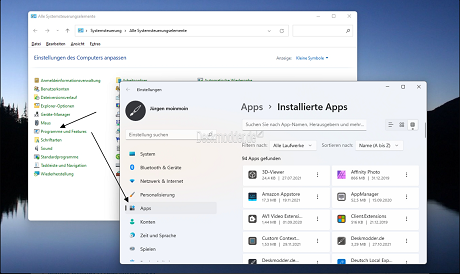 Programs and features is redirected to the settings
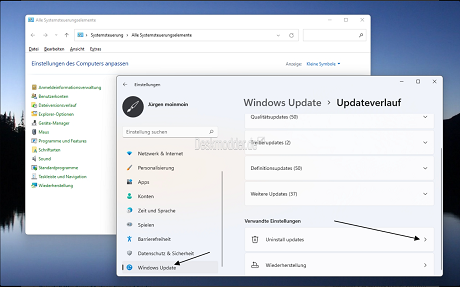 Only uninstall updates in the settings
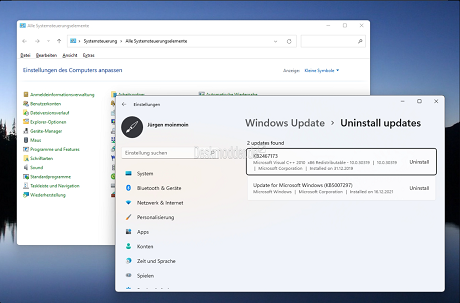 New place to uninstall updates
Here Microsoft has removed the redirection under Windows Update -> Update history -> Under "Additional options", the entry "Uninstall updates" and the updates are now listed in the settings. The OptionalFeatures.exe for the optional Windows features via Windows key + R continues to work.
There will certainly be other changes to come and some will certainly rant again. But if you want to have everything in one place, the settings, you have to get used to it. Is similar to the old Disk Cleanup that Microsoft has currently removed from the properties of the drive in the dev too. Here I got used to marking the drive in the File Explorer in Windows 11 (22000) and then calling up the 3-point -> Clean up.
source

