Recent Posts

Pages: 1 ... 8 9 [10]
91
Microsoft has removed 119 extensions from the Edge add-on store which were all tied to one adware campaign.

In a paper titled “Inside StegoAd: How We Disrupted a Massive Malicious Extension Campaign,” Microsoft researchers detail how they uncovered and dismantled a sophisticated malware campaign that abused browser extensions to infect users. According to Microsoft, the campaign involved 119 malicious browser extensions which were downloaded by 2.6 million users.

The extensions all promised, and delivered, some kind of basic functionality: ad blockers, VPNs, translators, video downloaders, calculators, coupon extensions and so on. But after a while they turned out to be “sleepers” and secretly started downloading additional malware.

Among the payload was malware involved in ad fraud, but also extensions that ran arbitrary JavaScript pushed from the server, which stole Google credentials and second-factor codes at sign-in, harvested WordPress admin logins, and exfiltrated cookies in bulk for session hijacking.

The name of the campaign “StegoAd” is derived from the words advertising and steganography, which means techniques of hiding secrets in something that doesn’t immediately cause suspicion. In this case, hiding code in images.

And not only did the cybercriminals try to stay under the radar by waiting for some time, and hiding malicious code inside images, they also left some victims alone. Some of the extensions only went rogue in about 10% of installs, which would actually execute the next stage of the malware, while the other ~90% would be left alone (at least for that execution attempt). And, in some cases, they re-used names of well-known legitimate extensions to install an additional level of trust.

Browser extensions are a source of wealth for cybercriminals because it compares to installing a small program that lives inside your browser, which can see and report about everything you do on the internet.

Now I hear some of you thinking: I don’t use Edge. Or I’ve used it just once, to download and install my favorite browser. But although Microsoft discovered and analyzed the campaign, the techniques used in this campaign are applicable to Chromium-based browsers in general.

This campaign was less about exploiting a browser vulnerability and more about tricking users into installing a trusted-looking extension, then using sophisticated concealment techniques to avoid detection long enough to compromise systems.

How to stay safe

Always be careful when downloading extensions, even from the reputable app stores. As we’ve seen many times before, criminals manage to get their apps or extensions listed when they are only one update away from turning into malware. So, make sure that you trust the developer and don’t rely on reviews alone.

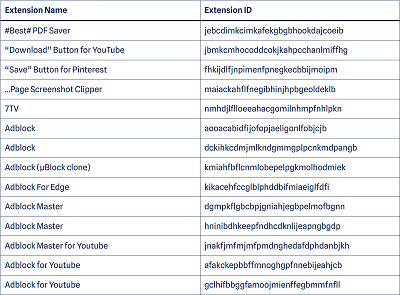
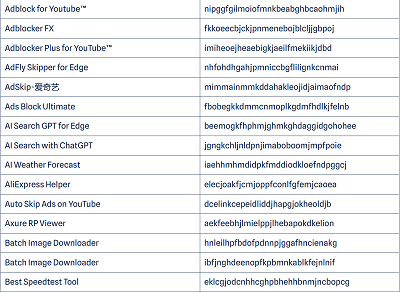
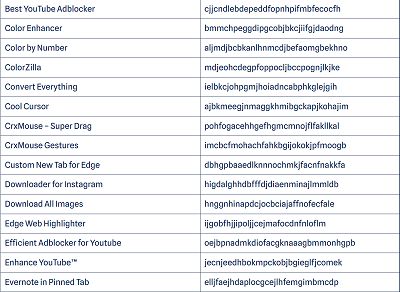
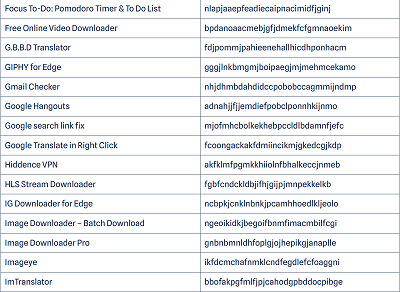
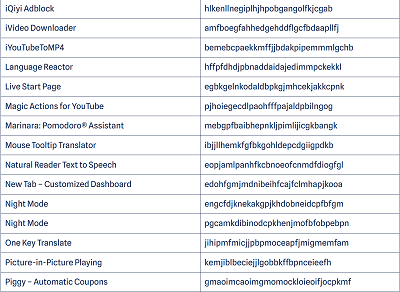
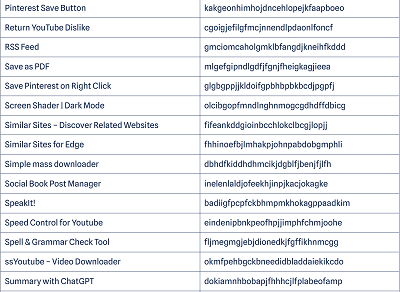
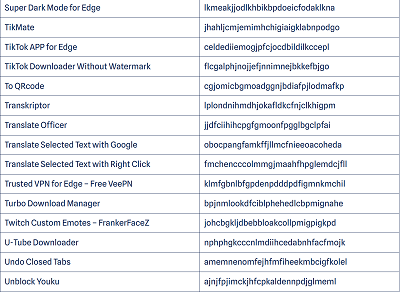
Use an up-to-date real-time security solution to detect and remove malicious extensions from your device and block connections to malicious domains and IP addresses. Remove the known malicious extensions from your browser. Below is an alphabetical list of the malicious extensions the researchers found by name.

Please note that there might be more than one extension that has the same name. In case you doubt whether the extension you have installed is among them, check whether the ID matches the one shown in the list. If you prefer looking them up by ID, you can find them organized differently in the Microsoft report (pages 40-43).


source
92
Apple / Apple releases security patches for iOS, MacOS Tahoe, Safari
« Last post by javajolt on July 07, 2026, 08:49:46 AM »


Apple has released security updates for more than two dozen security vulnerabilities across iPhone, iPad, and Mac.

The updates for iOS/iPadOS, MacOS Tahoe, and Safari were issued after testing on iOS 26.6 and iPadOS 26.6 betas.

What stands out in the update is that a lot of the vulnerabilities were found in WebKit, the browser engine that powers Safari as well as every browser on iPhone, including Chrome, Firefox, and Edge. It also looks like several of the issues Apple has addressed can be chained together to steal data or run malicious code with little or no user interaction.

Updates for your particular device

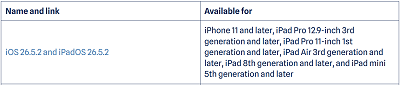
The table below shows which updates are available and points you to the relevant security content for that subject.


How to update your Apple devices

How to update your iPhone or iPad

For iOS and iPadOS users, here’s how to check if you’re using the latest software version:

Go to Settings > General > Software Update. You will see if there are updates available and be guided through installing them.

Turn on Automatic Updates if you haven’t already—you’ll find it on the same screen.


How to update macOS on any version

To update macOS on any supported Mac, use the Software Update feature, which Apple designed to work consistently across all recent versions. Here are the steps:

• Click the Apple menu in the upper-left corner of your screen.

• Choose System Settings (or System Preferences on older versions).

• Select General in the sidebar, then click Software Update on the right. On older macOS, just look for Software Update directly.

• Your Mac will check for updates automatically. If updates are available, click Update Now (or Upgrade  Now for major new versions) and follow the on-screen instructions. Before you upgrade to macOS Tahoe 26, please read these instructions.

• Enter your administrator password if prompted, then let your Mac finish the update (it might need to restart during this process).

• Make sure your Mac stays plugged in and connected to the internet until the update is done.

How to update your Safari browser

Safari updates are included with macOS updates, so installing the latest version of macOS will also update Safari. To check manually:

• Open the Apple menu > System Settings > General > Software Update.

• If you see a Safari update listed separately, click Update Now to install it.

• Restart your device when prompted.

If you’re on an older macOS version that’s still supported (like Sonoma or Sequoia), Apple may offer Safari updates independently through Software Update.

Technical details

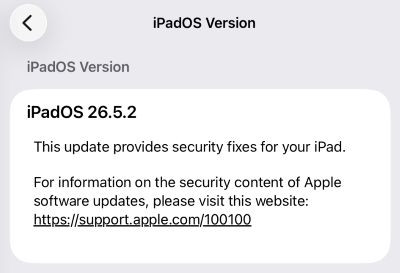
On iPhone and iPad, every browser—Safari, Chrome, Firefox, Edge—is forced to use Apple’s WebKit engine, which is exactly where most of the 26.5.2 fixes land. Apple and independent write‑ups describe a chain of WebKit issues, including use‑after‑free bugs, memory corruption, and cross‑origin logic errors that could be triggered simply by loading a malicious page. In several cases, the impact ranges from crashing your browser to corrupting memory or leaking data from other sites you have open in different tabs.

And there are some other browser related issues. Apple also notes fixes in Web Extensions and permission handling that could have allowed browser extensions or sites to access more data than intended. Plus some that are scattered across related libraries and frameworks such as libxslt, and WebRTC.

Libxslt is an open-source C library used to perform transformations on XML documents. It enables developers to convert raw XML data into other formats, such as HTML, plain text, or other XML structures.

WebRTC (Web Real-Time Communication) is an open-source technology that allows web browsers and mobile apps to communicate directly with each other.

None of the patched vulnerabilities are known to be exploited in the wild, but that doesn’t mean you can relax. One thing to consider when you are scheduling this update is that, due to the beta testing, the details of these vulnerabilities have been public knowledge for a while, so the race to come up with an exploit has already started.

source
93


If there was ever a time when it dawned on users how full of holes the software they’ve been using is, it’s now. Last month Microsoft pushed out its biggest patch Tuesday update ever. And yesterday, on the last day of June, Google published an update which included a whopping 382 security fixes.

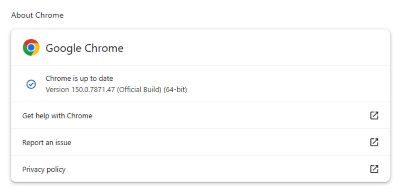
The stable channel has been updated to 150.0.7871.46/.47 for Windows and Mac, 150.0.7871.46 for Linux, and 150.0.7871.63 for Android. The update will roll out over the coming days and weeks.

How to update Chrome

If you don’t want to wait for the rollout to reach you, manually updating is easy.

The easiest option is to allow Chrome to update automatically. But you can end up lagging behind on updates if you never close your browser or if something goes wrong, such as an extension preventing the update.

To update manually, click the More menu (three dots), then go to Settings > About Chrome. If an update is available, Chrome will start downloading it automatically. Restart Chrome to complete the update, and you’ll be protected against these vulnerabilities.


Chrome 150.0.7871.47 is up to date

You can find an explanation of the version numbering system and step-by-step instructions in our guide to how to update Chrome on every operating system.

Technical details

Among the 382 security fixes are 358 found by Google itself, with 15 of those are rated as Critical. Google rates them as Critical severity because they could allow an attacker to run arbitrary code outside the browser’s sandbox, which makes it the highest tier on its rating scale. So, it’s reassuring that Google found these before anyone else did. Because apparently not all bug hunters believe in responsible disclosure.

Google uses internal code sanitizer tools and fuzzing techniques to find these vulnerabilities. It probably also helps that it is on the list of companies that are allowed to use advanced AI platforms to help them find these vulnerabilities.

One vulnerability rated as High stands out. It’s a flaw tracked as CVE-2026-13789. The official description is:

Quote
“Use after free in GPU in Google Chrome prior to 150.0.7871.47 allowed a remote attacker who had compromised the renderer process to potentially perform a sandbox escape via a crafted HTML page.”

Vulnerabilities that allow an attacker to escape the sandbox—which means it can impact the whole device—are valuable if you can chain them with others. The browser sandbox is a restricted, sealed-off environment that is supposed to contain any malicious activity within the browser rather than directly on your whole computer. So a sandbox escape is dangerous because it can help attackers move from “something bad happened inside the browser” to “something bad can affect the wider system.”

Use-after-free is a class of vulnerability caused by incorrect use of dynamic memory during a program’s operation. If, after freeing a memory location, a program does not clear the pointer to that memory, an attacker can abuse that mistake by causing a crash in a program or make it run code it should not run.

In Chromium/Chrome architecture, the term GPU usually denotes the dedicated GPU process that handles hardware-accelerated rendering, compositing, WebGL, video decode, and related graphics operations.

Via a crafted HTML page means it could exploit a target’s device through a malicious website, an HTML email, or an embedded HTML document.

So, again, update as soon as you can. Users of other Chromium browsers, keep an eye out for your next update.

source
94
Strategies, Implementation, and Best Practice are all covered in this free to download eBook.

The National Institute of Standards and Technology (NIST) Cybersecurity Framework, produced in response to a 2014 US Presidential directive, has proven essential in standardizing approaches to cybersecurity risk and producing an efficient, adaptable toolkit for meeting cyber threats. As these threats have multiplied and escalated in recent years, this framework has evolved to meet new needs and reflect new best practices, and now has an international footprint. There has never been a greater need for cybersecurity professionals to understand this framework, its applications, and its potential.

A Comprehensive Guide to the NIST Cybersecurity Framework 2.0 offers a vital introduction to this NIST framework and its implementation. Highlighting significant updates from the first version of the NIST framework, it works through each of the framework’s functions in turn, in language both beginners and experienced professionals can grasp. Replete with compliance and implementation strategies, it proves indispensable for the next generation of cybersecurity professionals.

A Comprehensive Guide to the NIST Cybersecurity Framework 2.0 readers will also find:

   • Clear, jargon-free language for both beginning and advanced readers

   • Detailed discussion of all NIST framework components, including Govern, Identify, Protect, Detect, Respond, and Recover

   • Hundreds of actionable recommendations for immediate implementation by cybersecurity professionals at all levels

A Comprehensive Guide to the NIST Cybersecurity Framework 2.0 is ideal for cybersecurity professionals, business leaders and executives, IT consultants and advisors, and students and academics focused on the study of cybersecurity, information technology, or related fields.

How to get it

Follow this link to get your copy of A Comprehensive Guide to the NIST Cybersecurity Framework 2.0. This link will redirect you to my One Drive account and click Download. [system administrator]

source
95
Driver 26.6.4 is out with an important fixes for Windows 10 and RX 7000 Series owners.

AMD is rolling out yet another graphics driver. Version 26.6.4 is now available for download, bringing two important fixes. One is for those still using Windows 10 and having trouble installing driver 26.6.2. In fact, this patch is coming from the recently released hotfix, so it is not new if you are already running version 26.6.3.

The second fix is for RX 7000 owners. AMD recently brought FSR 4.1 support to the previous-gen graphics cards, but there was a bug with certain games crashing when using FSR 4.1. I experienced this issue with Forza Horizon 6, so today's driver should take care of that.

Here is the official changelog:

• Intermittent install issue seen when installing AMD Software: Adrenalin Edition 26.6.2 on Windows® 10 systems for Radeon™ RX 7000 series and above graphics products.

• Intermittent application crash may be observed in some games with AMD FSR Upscaling 4.1 enabled on Radeon™ RX 7000 series graphics products.

Known issues include the following:

• Intermittent application crash or driver timeout may be observed while playing Battlefield™ 6 on AMD Ryzen AI 9 HX 370. AMD is actively working on a resolution with the developer to be released as soon as possible.

• Texture flickering or corruption may appear while playing Battlefield™ 6 with AMD Record and Stream on some AMD graphics products.

• AMD FSR Upscaling and AMD FSR Frame Generation may show as inactive in AMD Software: Adrenalin Edition while playing Battlefield™ 6 when enabled on Radeon™ RX 9000 series graphics products.

• Failure to install may be observed while installing AI Bundle components in some regions with limited access to HuggingFace and GitHub.

• Model flickering or rendering failure may be observed in Maxon Cinema 4D and Blender on Radeon™ RX 7000 series and above graphics products. Users experiencing this issue are recommended to install AMD Software: Adrenalin Edition 26.3.1.

• Intermittent application crash may be observed on some models while running Blender on Radeon™ RX 7000 series and above graphics products. Users experiencing this issue are recommended to install AMD Software: Adrenalin Edition 26.3.1.

You can download the AMD Radeon driver 26.6.4 from the official website here. Full release notes are available on the same page.

source
96
Making smartphones in the United States faces many challenges, from lack of infrastructure to high costs and skilled labor shortages.

If you look at the back of some Apple products, you can see the famous phrase “Designed by Apple in California, Assembled in China.” This phrase appears on products from one of the largest smartphone brands in the United States. These products are designed in the U.S., but their manufacturing takes place in China, India, Vietnam, or even Brazil.

But why can’t Apple, as one of the largest American tech companies, produce its iPhones on U.S. soil? The idea for this topic came to me after the Trump Foundation launched a smartphone called the T1 and claimed that it was designed and built with American values in mind.

However, this claim did not last long, as it was revealed that Trump’s phone was actually a rebranded HTC U24 Pro, with only a gold case and minor internal component changes. You see? Even a phone that is supposed to represent American values is manufactured in China.

With a gross domestic product (GDP) exceeding $32 trillion, the United States is currently the world’s largest economy, while China ranks second with around $20 trillion. On the other hand, the United States is by a wide margin the global leader in various technological fields, and American companies spend hundreds of billions of dollars annually on research and development. From Apple and Google to Microsoft, Lockheed Martin, Boeing, and others, American tech and industrial giants lead their foreign competitors in many sectors.

The United States also has no shortage of smartphone brands. Apple, Google, and Motorola are among the major brands in the smartphone market, collectively holding a significant share. However, the vast majority of their products are manufactured outside the United States.

So why is it that the world’s largest economy, home to the most advanced technology companies and industrial powers, cannot produce a smartphone on its own soil? Let’s explore this question together.

Even threats to impose tariffs won’t work

After Trump entered the White House as the 47th President of the United States, his administration adopted strict tariff policies. One of these policies was the imposition of a 25% tariff on smartphones manufactured outside the United States.

Trump said he “had a little problem” with Apple CEO Tim Cook over producing smartphones outside the U.S. So he thought that threatening a 25% tax on imported phones might force Apple to bring manufacturing back to the United States. “I have long ago informed Tim Cook of Apple that I expect their iPhones that will be sold in the United States of America will be manufactured and built in the United States, not India, or anyplace else,” Trump wrote on Truth Social.

Although Apple currently manufactures some of the iPhone’s chips in the United States with TSMC's help, it still shows no willingness to shift full iPhone production to the country. At the time, renowned Apple supply chain analyst Ming-Chi Kuo wrote on X, “In terms of profitability, it’s way better for Apple to take the hit of a 25% tariff on iPhones sold in the US market than to move iPhone assembly lines back to the US.”

However, manufacturing a smartphone in the United States is not as easy as it might seem, and many technical and economic barriers are involved.

The lack of necessary manufacturing hubs

There is a clear reason why many companies prefer to manufacture their products in China. China has established itself as the main global manufacturing hub for international companies, and over the past few decades, large contract manufacturers have emerged there, allowing companies like Apple to outsource production. One such example is Foxconn, which also manufactures some Apple products in India.

Building the infrastructure required to produce smartphones in the United States would require tens of billions of dollars in new investment. Factories would need to be built, essential manufacturing equipment would have to be installed, and, most importantly, a skilled workforce capable of operating these systems would need to be recruited and trained.

The United States currently lacks the core infrastructure needed to manufacture smartphones, and for this reason, many companies prefer to outsource production to Chinese contractors rather than spend tens of billions of dollars to build that infrastructure, which is significantly more economically efficient. Additionally, building such infrastructure in the United States could take up to a decade, ultimately leading to a significant increase in the product's final price for consumers.

Shortage of trained labor in the U.S. compared to China

Decades of serving as a global manufacturing hub have allowed China to build a massive talent pool in the production sector that is almost unmatched worldwide. Today, if a company chooses to manufacture its products in China, it can be confident that the workers involved in production have years of experience in their respective roles and are capable of producing high-quality goods with minimal errors.

Even if we assume that tens of billions of dollars were invested in building smartphone manufacturing infrastructure in the United States, finding skilled workers would remain highly challenging.

In a 2015 interview on CBS’s 60 Minutes, Tim Cook said the main reason Apple isn’t producing in the US is a lack of skills. "China put an enormous focus on manufacturing, in what you and I would call vocational kind of skills. The US over time began to stop having as many vocational kinds of skills. I mean you could take every tool and die maker in the United States and probably put them in the room that we're currently sitting in. In China you would have to have multiple football fields,” Cook said.

Also, in 2017, at the Fortune Global Forum in Guangzhou, Cook once again emphasized the importance of highly skilled Chinese workers. “China has moved into very advanced manufacturing, so you find in China the intersection of craftsman kind of skill, and sophisticated robotics and the computer science world. That intersection, which is very rare to find anywhere, that kind of skill, is very important to our business because of the precision and quality level that we like. The thing that most people focus on if they’re a foreigner coming to China is the size of the market, and obviously, it’s the biggest market in the world in so many areas. But for us, the number one attraction is the quality of the people,” Apple CEO said.

Higher labor costs in the United States

Producing almost any product in the United States is more expensive than in many other countries, and one of the main reasons is the higher cost of labor in the U.S.

According to the Bureau of Labor Statistics, median weekly earnings of full-time workers in the United States were $1,235 in the first quarter of 2026. Meanwhile, the average annual salary in China's private sector in 2025 was RMB 71,590 (US$9,961). In many parts of the world, the weekly wage of an American worker is equivalent to several months of income.

Another important factor to consider is that in the United States, the workforce capable of working on a smartphone assembly line is highly specialized and therefore commands higher-than-average wages.

According to an estimate by Bank of America, producing an iPhone in the U.S. is technically possible, but “iPhone cost can increase 25% purely on higher labor cost in the U.S.” However, this 25% increase applies only if final assembly is performed in the United States while components are still sourced from China or elsewhere. In this case, the price of a base iPhone would rise from $799 to around $1,000.

But in another scenario, if Apple were to produce the required components for the iPhone within the United States, production costs could increase by more than 90%.

Trump’s dream for a “Made in the USA” iPhone might never come true

In a free-market capitalist economy, one of the primary responsibilities of any CEO is to maximize profit. Using Apple as an example, Tim Cook’s role is to maximize the company’s profits so that it can fund research and development for new products and invest in areas such as artificial intelligence, while also keeping shareholders satisfied.

Therefore, it is entirely understandable that Apple would choose not to bring its manufacturing back to the United States and instead keep production in countries where labor is cheaper, and products can be manufactured at a lower cost, thereby maximizing its profit margins.

source
97
Now ships its own free distro that’s nothing like Ubuntu or Fedora
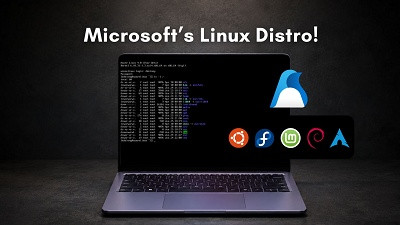

Azure Linux 4.0 is Microsoft's own Linux distribution, built for cloud servers and containers on Azure.

Twenty-five years ago, Microsoft’s CEO, Steve Ballmer, called “Linux a cancer that attaches itself in an intellectual property sense to everything it touches.” At Build 2026 in June, the same company shipped its own Linux distribution to the public. Well, at least the product is not a joke!

Azure Linux 4.0 is a real, open-source Linux distribution maintained entirely by Microsoft. It is derived from Fedora, runs on Azure virtual machines, and has already been powering Microsoft’s own infrastructure for years without most people knowing its existence.

What Build 2026 changed is that it is now a free product for anyone to download and use. However, it’s completely different from the other popular Linux Distros like Ubuntu or Mint.



What is a Linux distribution, and where Azure Linux 4.0 fits

Linux itself is just the kernel, the core layer that manages hardware, memory, and processes.

A distribution, or distro, takes that kernel and packages it with everything else an operating system needs, including a package manager to install software, system tools, default configurations, a support structure, and a graphical user interface that helps regular folk use the OS.

Ubuntu, Fedora, Debian, Red Hat Enterprise Linux, and Arch Linux are all distributions built on the same Linux kernel, each with different goals and audiences.



Azure Linux 4.0 is Microsoft’s entry into this list. It is built from Fedora 43 as its upstream base, meaning it uses the same RPM package format, package lineage, and ecosystem as Fedora and Red Hat. The difference is that Microsoft curates the package set, maintains the security patches, and tunes it specifically for running cloud workloads on Azure.



How Azure Linux started and what changed with version 4.0

Azure Linux started in 2019 under the name CBL-Mariner, short for Common Base Linux Mariner, as an internal Microsoft project to build a lightweight, secure OS for Azure’s own infrastructure. By 2022, it was already powering production workloads at scale, including AKS (Azure Kubernetes Service), Azure SQL, and Azure Cosmos DB.

LinkedIn migrated its entire infrastructure to Azure Linux 3, and Databricks moved more than 100,000 VMs and over a million CPU cores to it with zero customer-facing incidents. Microsoft renamed it Azure Linux in March 2024.
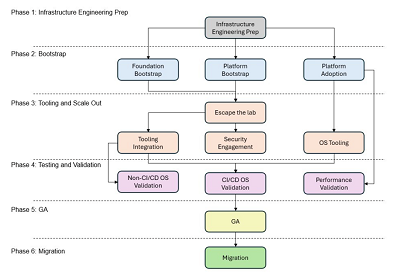


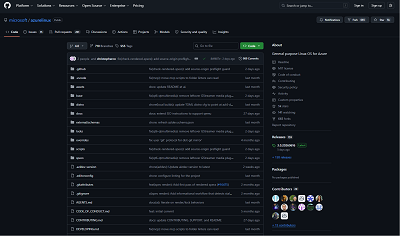
Versions 1 through 3 were assembled package by package by Microsoft engineers writing their own spec files. Version 4.0 changes the foundation. Instead of maintaining every component from scratch, Microsoft now builds Azure Linux as a set of declarative overlays on top of a Fedora 43 snapshot, with every deviation from the upstream documented in the public GitHub repository. Anyone can inspect what Microsoft changed and why.


The previous version also used tdnf, a stripped-down package manager Microsoft built itself. Version 4.0 switches to dnf5, the same package manager Fedora and Red Hat use, which is faster, uses less memory, and makes the distribution behave more predictably for anyone already familiar with Red Hat.

Officially announced at the Open Source Summit North America on May 18, 2026, and launched into public preview at Build 2026 on June 2, Azure Linux 4.0 is now available on Azure VMs and VM Scale Sets, with AKS support and a WSL distribution coming shortly after.

How Azure Linux 4.0 differs from Ubuntu, Fedora, and RHEL

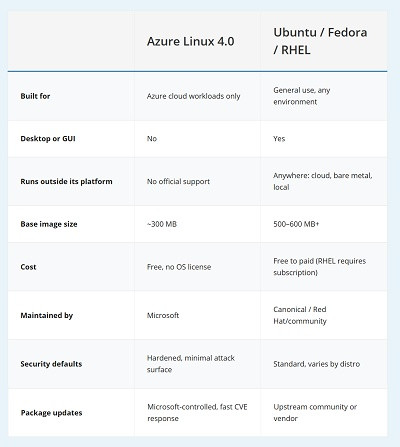
The most important thing to understand about Azure Linux 4.0 is what it is not. It is not a general-purpose distribution like Ubuntu or Fedora that you install on a laptop, set up a desktop, and use as your daily driver. There is no graphical interface. There is no audio stack. There is no desktop environment. The base image does not even ship with a pager like less. It installs only what cloud and server workloads need, nothing more.
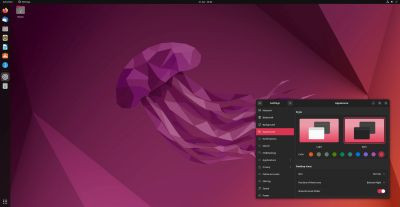

Ubuntu

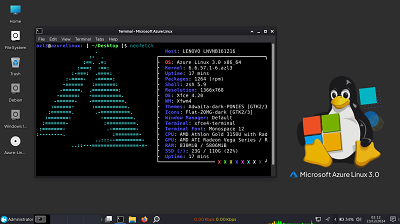
Azure Linux 4.0 is entirely text-based, with no graphical setup wizard as you would find on Fedora or Ubuntu. Creating a user account is optional during setup and easy to miss, which would leave you unable to log in.

Once running, it drops you directly to a console with Bash as the default shell. There is no desktop waiting on the other side. To try something similar yourself, download the ISO from the Azure Linux GitHub repository, spin up a VirtualBox or Hyper-V virtual machine, and point it at the ISO. Do not expect a Fedora-style GUI installer or any desktop components.

The minimal design is the point. A smaller package footprint means a smaller attack surface and fewer vulnerabilities to patch each month. For server and container workloads, you want an OS that is invisible, predictable, and fast.

Ubuntu Server, Fedora Server, and Red Hat Enterprise Linux are also stripped-down compared to their desktop variants, but they still carry significantly more than Azure Linux does by default. And critically, those distributions are supported and designed to run anywhere, including on-premises, on other clouds, on physical hardware. Azure Linux 4.0 is explicitly a cloud-only distribution. Running it outside Azure is technically possible, but entirely unsupported by Microsoft.


What is inside Azure Linux 4.0

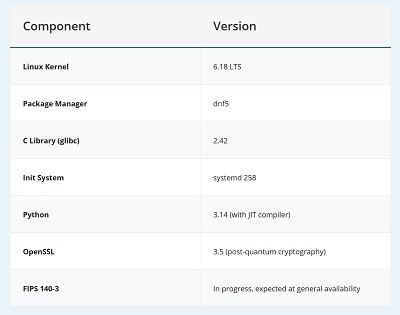
If you’re curious about the technical stack, here is what ships with the current public preview:

The kernel is Linux 6.18 LTS, tuned specifically for Azure with optimized Hyper-V integration and GPU and AI accelerator support. The package manager is dnf5, a complete rewrite of the older DNF in C++ rather than Python, which makes it noticeably faster on dependency resolution.

The base C library is glibc 2.42, and the init system is systemd 258. Python 3.14 is included with its new JIT compiler. OpenSSL 3.5 ships with post-quantum cryptography support, covering the CRYSTALS-Kyber and CRYSTALS-Dilithium algorithms that NIST standardized, which is a meaningful differentiator for enterprise customers with regulatory requirements.

FIPS 140-3 certification is still in progress and will not be available until general availability. For government, financial services, and healthcare workloads where FIPS compliance is a hard requirement, Azure Linux 4.0 is not yet a drop-in replacement for certified RHEL builds, though Microsoft expects to close that gap before general availability later in 2026.


Azure Container Linux, the companion product

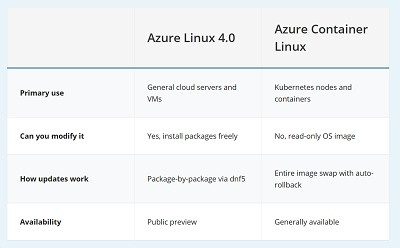
Azure Container Linux is Microsoft’s second Linux product from Build 2026, and it is easy to confuse with Azure Linux 4.0 since they share the same kernel and security update schedule.

The main difference is that Azure Container Linux is immutable. The OS ships as a read-only image, so you cannot install packages, change settings, or make any changes on a running system. When an update arrives, Windows swaps the entire image out for a new one, with an automatic rollback if something breaks. It has been running quietly underneath Azure’s Kubernetes service (AKS) since 2023, and version 4.0 makes it available as a standalone product for the first time.


Why Microsoft built its own Linux distribution

Linux is now the most popular operating system on Azure. More Linux instances run on Microsoft’s own cloud than Windows Server instances. And the Linux running there, Ubuntu, RHEL, SUSE, and Debian, is maintained by other companies. Every time a customer runs Red Hat on Azure, Red Hat collects the support subscription revenue. Microsoft provides the infrastructure but splits the OS revenue.

If Microsoft can get customers to standardize on its own distribution with Azure Linux, it controls the entire stack and the supply chain end to end. Every package is cryptographically signed, and Software Bill of Materials (SBOM) documents are published for every release. For enterprise teams in regulated industries, the ability to hold a single vendor accountable for the entire OS layer is a serious selling point.

Source: GitHub

It is the same reason Amazon built Amazon Linux, and Google built Container-Optimized OS. Azure Linux is Microsoft joining a list that every major cloud provider is already on.

Also, Microsoft is explicitly marketing Azure Linux as the distribution you can run in WSL during development and then deploy to Azure in production, eliminating the environment mismatch problem where code that works locally breaks in the cloud. It gets more compelling once WSL Containers ships, because developers would be able to build, run, and test Linux containers locally using WSL and deploy to Azure Linux in production, all without leaving Windows.


Should you care about Azure Linux if you are not a cloud developer

Probably not yet, and that is fine. Azure Linux 4.0 is in public preview, carries a strict not-for-production warning, and is explicitly designed for cloud server and container workloads on Azure. If you run Ubuntu on your PC, deploy apps on RHEL, or use Fedora as a daily driver, nothing about Azure Linux displaces any of that.

What it does show is that Microsoft is now an active maintainer of a real distribution that runs production workloads for LinkedIn and Databricks, and it is now offering that distribution as a first-class option to anyone.

source
98
If you're still running Windows 10, Microsoft has some good news: it has extended the free Extended Security Update program for consumers by one full year. Here's everything you need to know.


Beata Zawrzel/NurPhoto via Getty Images
Microsoft's extension of Windows 10 security updates for a year past the official end-of-support date just got another one-year extension.

If you previously signed up for the Windows 10 Extended Security Updates program, your end date has been automatically moved out one full year. If you own a Windows 10 PC and haven't signed up for the ESU program, you can do so anytime between now and October 2027. Maybe we can call it the Extended Extended Security Updates program. (For details on the sign-up process, see "How to get free Windows 10 security patches on your PC.")

The company snuck out the news in a pair of tiny updates to previously published articles. The official Windows 10 Consumer Extended Security Updates (ESU) page now announces, in two places, that the program will end on Oct. 12, 2027, two years after Windows 10 support officially stopped. A check of the Internet Archive reveals that the update was made sometime in the last 30 days.

There is no indication anywhere on that page that the content has changed.

Meanwhile, a Microsoft spokesperson pointed out that an Editor's note has now been appended to the end of a Microsoft blog post urging customers to update to Windows 11 before support ends for Windows 10:

Quote
Editor's note – June 25, 2026 – This post has been updated to reflect that the Windows 10 Extended Security Updates (ESU) program for personal use devices is being provided for an additional year, with coverage now available through Oct. 12, 2027. This extension provides customers with more time to transition to a new Windows 11 PC while continuing to receive critical security updates.

That post was originally published on June 24, 2025. It is more than 3000 words long. There is no indication at the top of the page that the program has changed in any way or that the post has been updated.

It's almost like Microsoft was trying to bury this news on the same day Apple announced dramatic price increases for its flagship products.

But why?

Why is Microsoft being so shy about what is ultimately a consumer-friendly move?

Reason #1 is that the company really, really does not want to anger its OEM partners, who are already struggling with the near-certainty of plummeting PC sales as the AI-fueled RAM shortage drives prices sky-high, with no signs of slowing.

Microsoft depends on those OEM customers -- Dell, HP, Lenovo, ASUS, and a host of smaller names, including its own Surface division -- to buy new Windows licenses for use on new PCs. Encouraging customers to hang on to their old PCs for longer flies in the face of that marketing imperative.

Reason #2 is that the number of PCs still running Windows 10 is likely much higher than execs in Redmond would like. That's pure educated guesswork on my part, because Microsoft will not disclose the numbers, but there are a significant number of PCs in the installed base that are simply incapable of upgrading to Windows 11 through normal channels.

Last January, Microsoft announced that the number of monthly active users of Windows 11 had passed the 1 billion mark. That sounds like good news until you realize that there are more than 1.5 billion Windows PCs in total. Even if another 200 million of them switched to Windows 11, that's still 20% of the installed base that's stuck on Windows 10. And it's a big raw number, too: at least 300 million PCs, all destined to fall off the "security cliff" when support finally, for real, no kidding, ends.

It doesn't help that Microsoft has publicly acknowledged that its customers have been unhappy with the quality of Windows 11 and pledged to "raise the quality bar". Those improvements are slowly making their way through the release pipeline, but most of them are still in Insider builds and have yet to reach the general public.

Today's change doesn't affect corporate Windows deployments. Anyone who wants to continue running Windows 10 in a managed environment has to pay dearly for the privilege. Business ESU subscriptions are available through the Microsoft Volume Licensing Program or through Microsoft's Cloud Service Provider partners.

The business ESU subscriptions run a total of three years, through October 2028. Could we see one more extension for consumers a year from now? Don't bet against it.

source
99

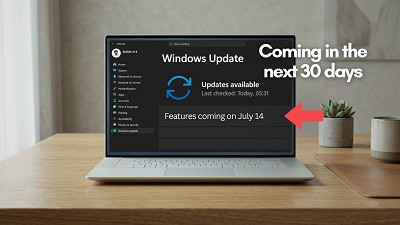
Top 5 features coming to Windows 11 PCs in the next 30 days

Windows 11 has been getting a lot of improvements and features lately. In June alone, Microsoft shipped its biggest Patch Tuesday of 2026, with the Low Latency Profile CPU boost, Shared Audio for Bluetooth headsets, Multi-App Camera support, and a two-character Windows Search threshold. And Microsoft is not slowing down.

In the next 30 days, five more practically useful features are heading to all Windows 11 PCs. These are coming first as an optional update in June itself, and will then reach everyone as part of the July 2026 Patch Tuesday update.


None of them requires a Copilot+ PC, and none of them are related to any AI subscription. We are talking about things like rolling back your PC if something breaks, a smarter way to pause updates, a quieter Widgets experience, a screen overlay for eye strain, and a long-overdue reliability fix for Bluetooth. Here is a closer look at all five.

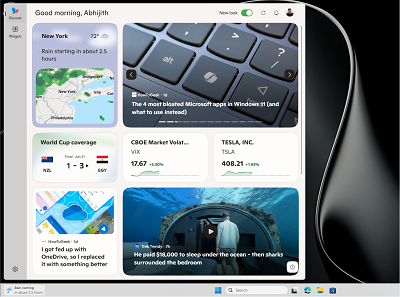
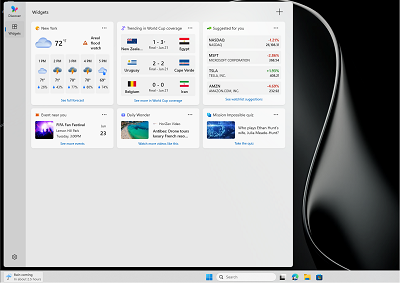
#1 Windows 11 Widgets stop being annoying by default

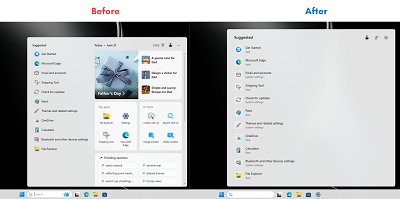
If you have ever accidentally hovered over the Widgets button on the taskbar and watched the entire board slide open while you were trying to click something else, you know the frustration. Microsoft is finally fixing that. After years of feedback, Widgets will no longer open on hover by default. The taskbar badge behavior is also being toned down, with notification counts now minimized by default and badge colors adjusted to match your Windows accent color.


Apart from that, first-time users will land directly on the Widgets dashboard instead of the MSN feed. Microsoft has been working toward turning off the MSN feed and ads in Widgets by default, and this update takes that further by making the lock screen experience simpler, too. New users will see only a Weather widget on the lock screen. Currently, it is a crowded bunch of cards with mostly irrelevant information.


Dashboard icons will now show the count of unread alerts at a glance, and badges clear automatically once you leave a dashboard. You can still configure everything from within Widgets settings. Widgets in Windows 11 already open news links in the default browser instead of Edge, and now the full experience is turning quieter and less intrusive, which is what most users wanted from the beginning.

#2 Windows 11 lets you pause updates indefinitely with a new calendar

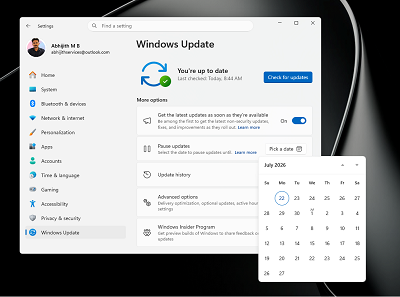
One of the most requested Windows features is finally arriving in a form that makes sense. Windows 11 is getting a calendar-based update pause system inside Settings, where you can pick an end date to pause updates for up to 35 days. You can also extend the pause by selecting a new end date and re-pause whenever you need to.


We have been covering this feature closely since Microsoft first started testing it. Microsoft confirmed earlier in 2026 that you can pause Windows 11 updates for as long as you want, ending the era of forced reboots. We also did a hands-on test of the new pause feature and found it to be a welcome departure from the five-week cap Windows 11 had before.

Back on April 13, we found that the company was planning to finally end forced Windows 11 updates with this approach. And recently, Microsoft itself said you should pause Windows 11 updates when you need to work, showing that Redmond has accepted users need more control. The new calendar picker in Windows Update is also a better UI.

#3 Point-in-time Restore rolls back your entire PC when things go wrong

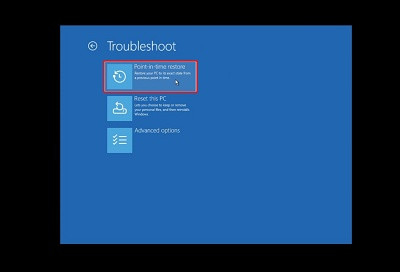
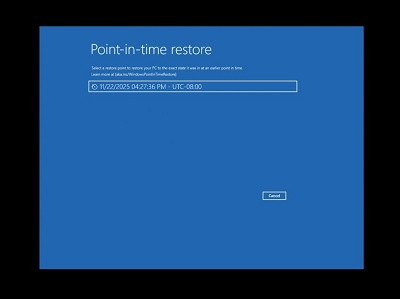
A bad Windows update, a misconfigured driver, or a broken app installation should not make you panic or lose hours to troubleshooting. Point-in-time Restore is a recovery feature Microsoft has been testing for months, and it is now making its way to all Windows 11 PCs. When turned on, Windows automatically creates restore points of your entire system, including apps, settings, and personal files, and keeps them for up to 72 hours. If something goes wrong, you can roll back to one of those snapshots from the recovery environment.


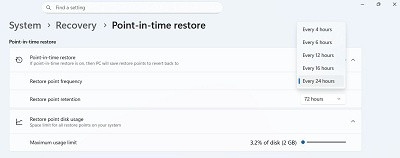
Available restore point frequencies

We tested Point-in-time Restore in Windows 11 back in November 2025 and called it one of the best features the OS has shipped without needing AI. Unlike the older System Restore, which only rolls back system files and registry settings, Point-in-time Restore captures everything on your OS volume, including your personal files. It uses Windows’ Volume Shadow Copy Service under the hood, creating block-level snapshots in the background without interrupting your work.


Once the feature comes to your PC, you can turn it on from Settings > System > Recovery. You can set how often restore points are created, anywhere from every 4 hours to every 24 hours, and how long they are kept. The feature works offline, so there is no dependency on the cloud, and of course, no subscription is required. For users who keep delaying Windows updates out of fear that something will break, this feature is the safety net that makes updating much less risky.


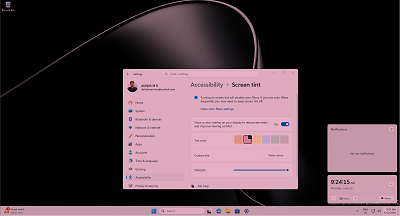
#4 Screen Tint gives users with eye strain a full-screen color overlay

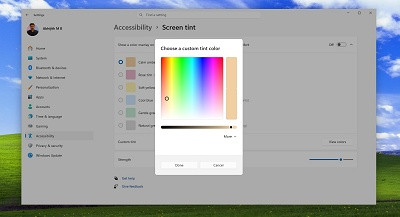
For users who get headaches or eye strain after long hours on a PC, Windows 11 is adding a dedicated Screen Tint feature as part of a set of accessibility improvements. Screen Tint applies a full-screen color overlay to make the display easier to look at, and it’s different from Night Light, which adjusts just the color temperature to warm or cool. Screen Tint lets you control the color and intensity.


We covered Screen Tint when it first appeared in testing and found up to six preset colors, including Calm amber, which is similar to Night Light, along with blue, green and other tints. You can also use a custom color and adjust the intensity using a slider. People who wear tinted glasses to reduce photosensitivity or those sensitive to certain screen colors now have a software alternative built right into Windows, accessible from Settings > Accessibility.


Image Courtesy: WindowsLatest.com

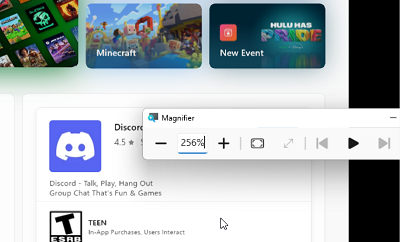
The same update also improves the Magnifier. You can now type a specific zoom percentage directly into the Magnifier window and adjust it in defined increments, rather than having to drag a slider. The Magnifier bar also now has a settings menu, so you can change zoom increments without having to go to Windows Settings each time. For users who rely on these accessibility tools every day, that extra trip to Settings was never necessary, and it is good to see Microsoft agree.


#5 Bluetooth gets the biggest reliability sweep Windows 11 has shipped at once

Bluetooth reliability on Windows has been a recurring complaint for years. Microsoft pledged to make Bluetooth, audio, camera, and USB connections stable on Windows 11 earlier in 2026, and this upcoming update is the most concentrated delivery of those promises yet. In one update, Bluetooth is getting improvements across microphone sync, device compatibility, audio stability, connection reliability, and device management. It is rare to see this many Bluetooth fixes simultaneously.

The biggest new addition is microphone mute sync. When you press the mute button on your Bluetooth headset, Windows will now keep the mute state in sync between the audio mixer and the Hands-Free Profile. Before this fix, the mute indicator on your headset could fall out of sync with what Windows 11 understood about the mic state, which caused confusion in calls and meetings. Intel separately addressed Wi-Fi and Bluetooth coexistence issues in April, but the mute sync problem was always on Microsoft’s side of the stack.


On the device compatibility front, AirPods will appear faster in pairing mode, and the Beats Studio Pro headphones get improved microphone reliability, making iPhone users a little happier with a Windows PC.

Bluetooth LE Audio streaming, which Windows 11 added to support features like Shared Audio for two headphones, recovers more reliably after a connection is lost and starts playing audio faster when the microphone is also in use. Classic Bluetooth audio devices reconnect more quickly after Windows resumes from hibernation.

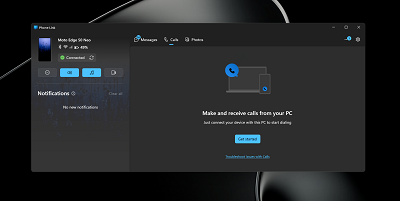
The Phone Link integration also gets smarter audio routing. When you dial an outgoing call from your phone paired to your PC, the audio now stays on the phone during ringing and only transfers to the PC after the call is answered on Windows. Previously, the audio could jump to the PC immediately, which was disorienting. Additionally, incoming calls from a paired phone will no longer ring on the PC when Do Not Disturb is turned on.


Other notable improvements coming to Windows 11 in a month


The address bar in File Explorer now handles paths with double backslashes and quotation marks, which fixes compatibility issues that tripped up power users and developers who copy-pasted paths.

The printer setup experience also gets a useful upgrade, with new printer installations defaulting to Internet Printing Protocol instead of older driver-based methods, simplifying setup for most users.

Voice access and voice typing on Copilot+ PCs get support for French, German, and Spanish, with real-time grammar correction, punctuation, and recognition error fixes as you speak. The touchpad right-click zone size is now customizable, with small, medium, and large options, which is handy on laptops where the bottom-right corner triggers right-clicks when you did not intend to.

What Windows Insiders are testing that has not reached your PC yet

While all five features above are heading to regular PCs through the upcoming June optional update and the July Patch Tuesday, Windows Insiders are testing an even longer list of changes that are still months away from general availability.

The most talked-about Insider exclusive right now is the movable taskbar, which lets you pin the taskbar to the top, left, or right side of the screen for the first time since Windows 11 launched. We tested it and also compared the Windows 11 taskbar with the Windows 10 taskbar, and the results are surprising, but Microsoft is still working through bugs before it rolls out to everyone.


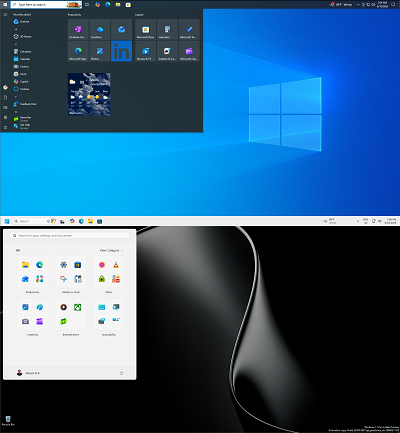
There is also the redesigned Start menu with full customization controls that Insiders in the Experimental channel are testing, along with improvements to Windows Search that handle typos and partial words for apps, and a toggle to remove Bing results from Search.


Here is a longer list of 18 confirmed features coming to Windows 11 in 2026, and if the pace of the last few months is any indication, the list of things coming to regular PCs is only going to grow.

source
100
Anyone selling, donating, or recycling an old smartphone risks handing over years of personal data, from banking credentials to private photos, unless the device is wiped in a way that makes recovery impossible. Apple’s own security documentation confirms that a proper wipe “obliterates all the keys in effaceable storage and renders all user data cryptographically inaccessible.” Yet the gap between a quick factory reset and genuine data destruction is wider than most phone owners realize, and federal agencies already treat the distinction as a matter of policy.

Why a factory reset alone falls short of true data destruction
The standard factory reset available on both iPhones and Android phones is designed for convenience, not forensic-grade sanitization. On Apple devices, the reset process works by destroying the encryption key that protects stored files. According to Apple’s platform guide, fast wipe is achieved by erasing an effaceable key, which renders files “cryptographically inaccessible.” Because the underlying data still sits on the flash storage, the security of this approach depends entirely on the strength of the encryption and the completeness of key destruction. If the key is gone and the encryption was properly implemented, the remaining data is effectively gibberish.

Android devices follow a similar principle when encryption is active. Google provides factory reset instructions that walk users through the settings menu, but the effectiveness of that reset hinges on whether the phone’s storage was encrypted before the wipe. Modern Android phones ship with encryption enabled by default, yet older models, particularly those running versions prior to Android 6.0, did not always enforce encryption out of the box. A factory reset on an unencrypted device simply marks storage blocks as available without scrambling the underlying bits, leaving data exposed to anyone with basic forensic tools.

The hypothesis that a manufacturer factory reset without an explicit purge step retains recoverable data at higher rates than key destruction or physical destruction is consistent with the technical design of both platforms. When encryption keys are properly destroyed, the data becomes unreadable. When they are not, or when encryption was never active, residual information persists on the storage medium in a form that forensic imaging can detect.

How NIST and the IRS define when data is truly gone
The federal government does not leave data sanitization to guesswork. The National Institute of Standards and Technology published SP 800-88 Rev. 2, formally titled Guidelines for Media Sanitization, which carries DOI 10.6028/NIST.SP.800-88r2 and is available through the NIST Computer Security Resource Center. That document defines three escalating methods for removing data from storage media: Clear, Purge, and Destroy. Clear uses logical techniques such as overwriting. Purge applies physical or logical methods that make data recovery infeasible even with state-of-the-art laboratory techniques. Destroy renders the media itself unusable through disintegration, incineration, or similar means.

These categories are not academic abstractions. The Internal Revenue Service’s own media sanitization guidelines explicitly reference NIST SP 800-88, directing staff to follow its framework when disposing of devices that held taxpayer information. The fact that a revenue agency handling some of the most sensitive personal data in the country relies on this standard signals how seriously the federal government treats the difference between a casual reset and a verified purge.

NIST’s broader work on information security and workforce skills, including initiatives like the NICE program, reinforces the idea that secure handling of digital media is a professional competency, not an optional extra. Within NIST’s Information Technology Laboratory, detailed guidance on cryptography and storage security reflects the same principle: when sensitive data is involved, organizations must be able to demonstrate that retired devices no longer pose a confidentiality risk, a theme echoed across the lab’s ITL resources.

For individual phone owners, the practical takeaway is straightforward. Apple’s wipe process, which destroys the effaceable encryption key, aligns closely with the Purge concept in NIST’s framework, because it makes data recovery infeasible without the key. Apple’s deployment documentation states that wiping “obliterates all the keys in effaceable storage and renders all user data cryptographically inaccessible.” Android’s factory reset achieves a comparable result only when full-disk or file-based encryption was active before the reset was triggered. Without that precondition, the reset falls closer to NIST’s Clear category, which offers a lower assurance level.

Gaps in the evidence and what phone owners should do first
No publicly available controlled study from NIST or another primary research body has published forensic recovery rates comparing consumer phones wiped via factory reset against those subjected to explicit Purge or Destroy procedures. The absence of that data means the exact scale of residual risk on post-reset consumer devices is not precisely quantified by an authoritative source. Independent security researchers have demonstrated data recovery from unencrypted Android phones after factory resets, but those findings have not been consolidated into a single peer-reviewed benchmark that NIST or a comparable institution has endorsed.

A second gap involves older Android devices still circulating through resale markets and donation programs. No official statement from Google quantifies how many active Android phones lack default encryption, and no Apple or Google disclosure addresses the residual risk when users skip encryption setup before performing a reset. That silence leaves phone owners without a clear way to verify whether their specific device model and software version will produce a forensically clean wipe.

For anyone preparing to part with an old phone, the safest approach is to treat a factory reset as one step in a multi-layered process rather than a complete solution. Before initiating the reset, users should confirm that device encryption is enabled in the settings menu and, if necessary, turn it on and allow the phone to complete the encryption process. Only after encryption is active should the owner trigger the factory reset or wipe option provided by the operating system.

Once the reset is complete, additional precautions can further reduce risk. Removing SIM and memory cards ensures that contact lists, text messages, and locally stored media are not inadvertently passed along with the handset. For devices that will not be reused-such as those with broken screens, swollen batteries, or other hardware failures-physical destruction of the storage chip, following the spirit of NIST’s Destroy category, offers the highest level of assurance. While most consumers lack access to specialized shredders, simply retaining nonfunctional phones rather than discarding them in general recycling streams avoids placing intact storage media into unknown hands.

Consumers should also be skeptical of third-party “secure erase” apps that promise to overwrite phone storage. On modern, encrypted smartphones, the operating system and hardware manage flash memory in complex ways, and poorly designed tools can provide a false sense of security without actually improving on the built-in wipe mechanisms. Relying on the platform’s native encryption and reset tools, combined with physical control over the device’s final destination, is more consistent with the layered approach reflected in federal sanitization standards.

The lack of definitive public metrics on post-reset data recovery should not be confused with a lack of risk. Until large-scale, methodologically rigorous studies emerge, phone owners must navigate disposal decisions using the best available technical guidance: enable encryption, use the manufacturer’s wipe function, remove removable media, and consider physical destruction for devices that will not be reused. Those steps mirror the escalating Clear, Purge, and Destroy concepts that federal agencies apply to their own hardware, and they offer ordinary users a practical way to keep old phones from becoming silent leaks of their digital lives.
Via MSN | Story and Pic
Pages: 1 ... 8 9 [10]